Viindoo
Odoo Community
Odoo Enterprise

Fleet Operations

Plan every route, dispatch every vehicle, and guide every driver from one cockpit.

Fleet Operations turns a pile of unassigned bookings into optimized routes in a single screen, then walks your drivers through each stop on their phone — so your dispatch desk and your drivers finally work from the same plan.

Powering Your Business Growth.
Fleet Operations

Extends viin_fleet_booking - see its documentation.
Key Features

Dispatch Board with a built-in VRP auto-planner

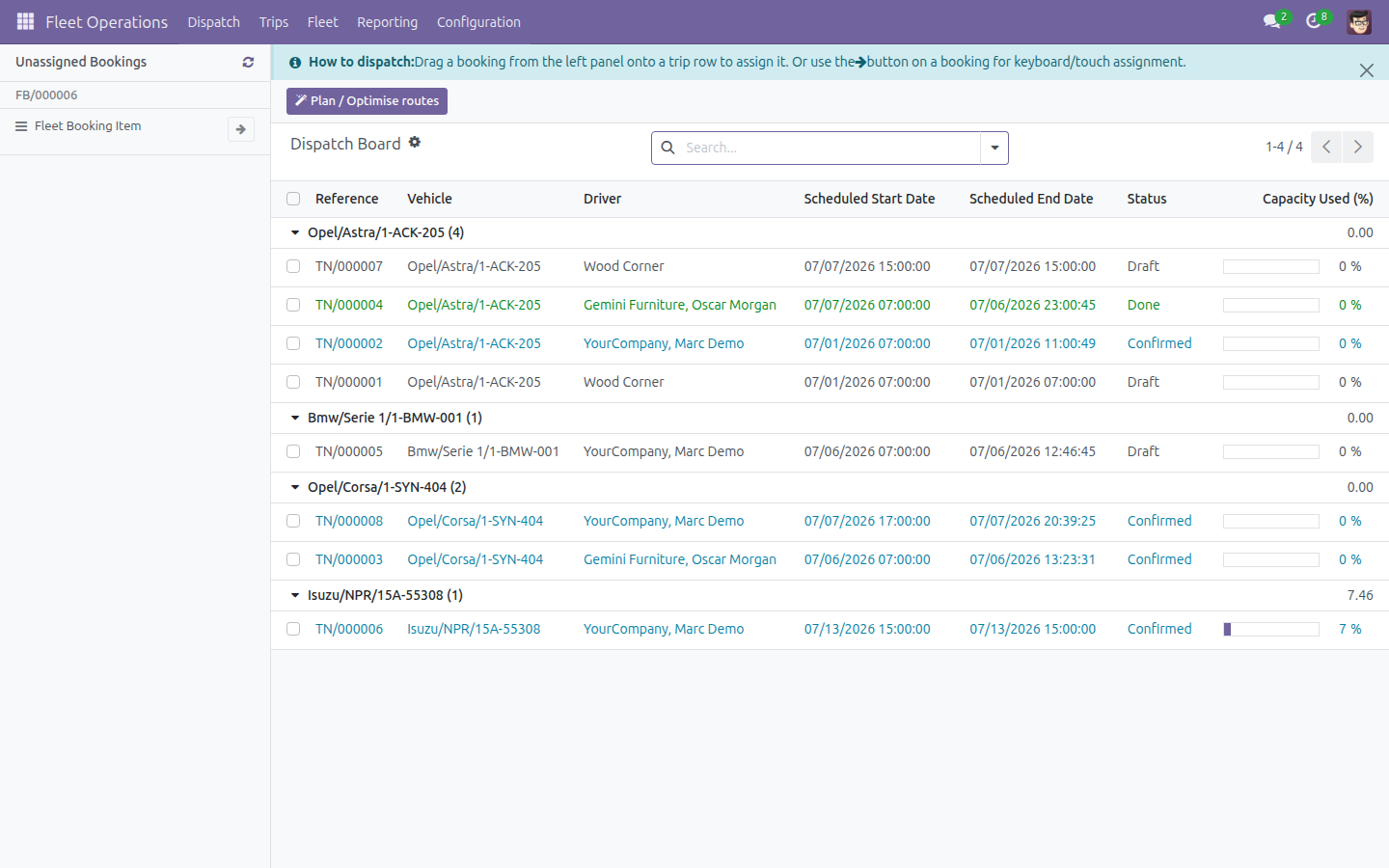
A drag-and-drop dispatch cockpit that combines an unassigned-bookings panel, a trip board grouped by vehicle, and a server-side OR-Tools optimization engine. Auto-plan the whole board or assign bookings by hand, then batch-confirm the result — all without leaving the screen.

Review before you commit

The optimizer never silently commits a plan. Every auto-planned proposal opens as a review overlay — one route card per vehicle with distance, duration and load-utilization bars — so your dispatcher accepts, adjusts or rejects the routing before a single real trip changes.

📱

“My Trips” driver mobile execution

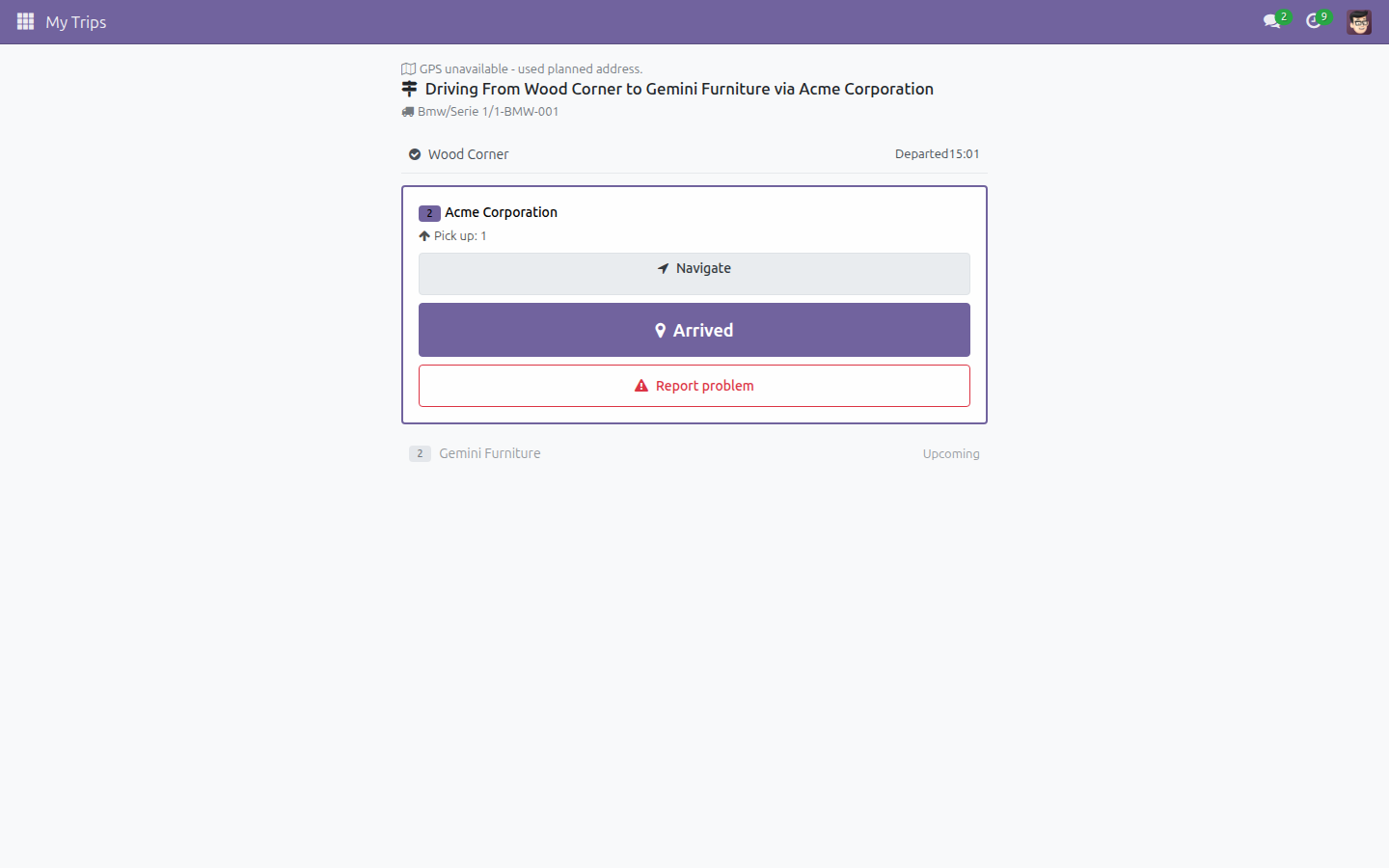
Each driver gets one focused, mobile-first screen showing only their assigned trip. A single adaptive button leads them stop by stop — Arrive, Load, Depart, Deliver, Finish — and GPS is captured on every stamp, so you know where and when each action happened.

One-tap exception reporting

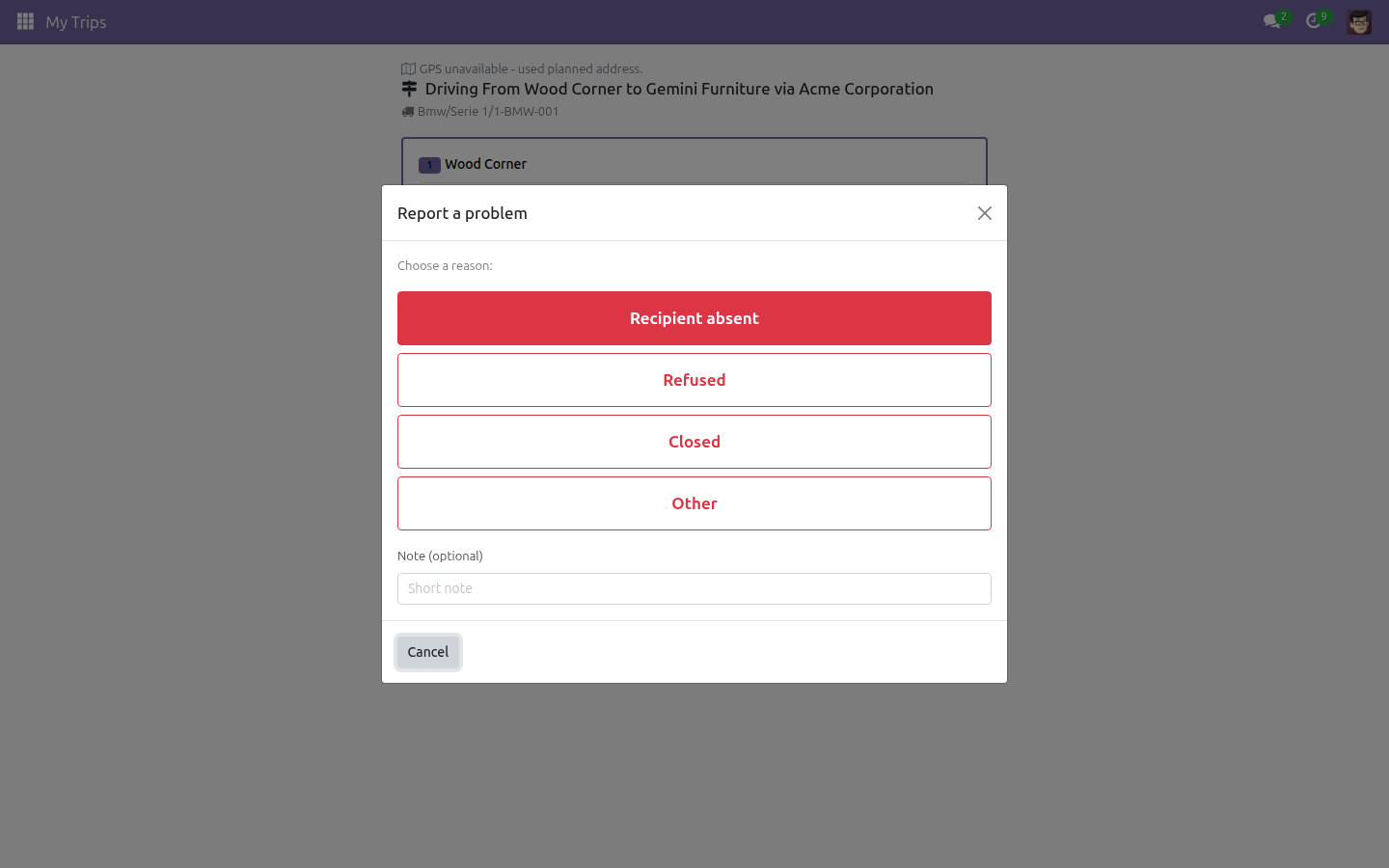
When a stop can’t be completed, the driver taps Report problem and picks a reason — Recipient absent, Refused, Closed or Other — with an optional note. The stop is marked Failed and the next action activates immediately, so a bad stop never stalls the whole trip.

🛡

Route-optimized trip planning

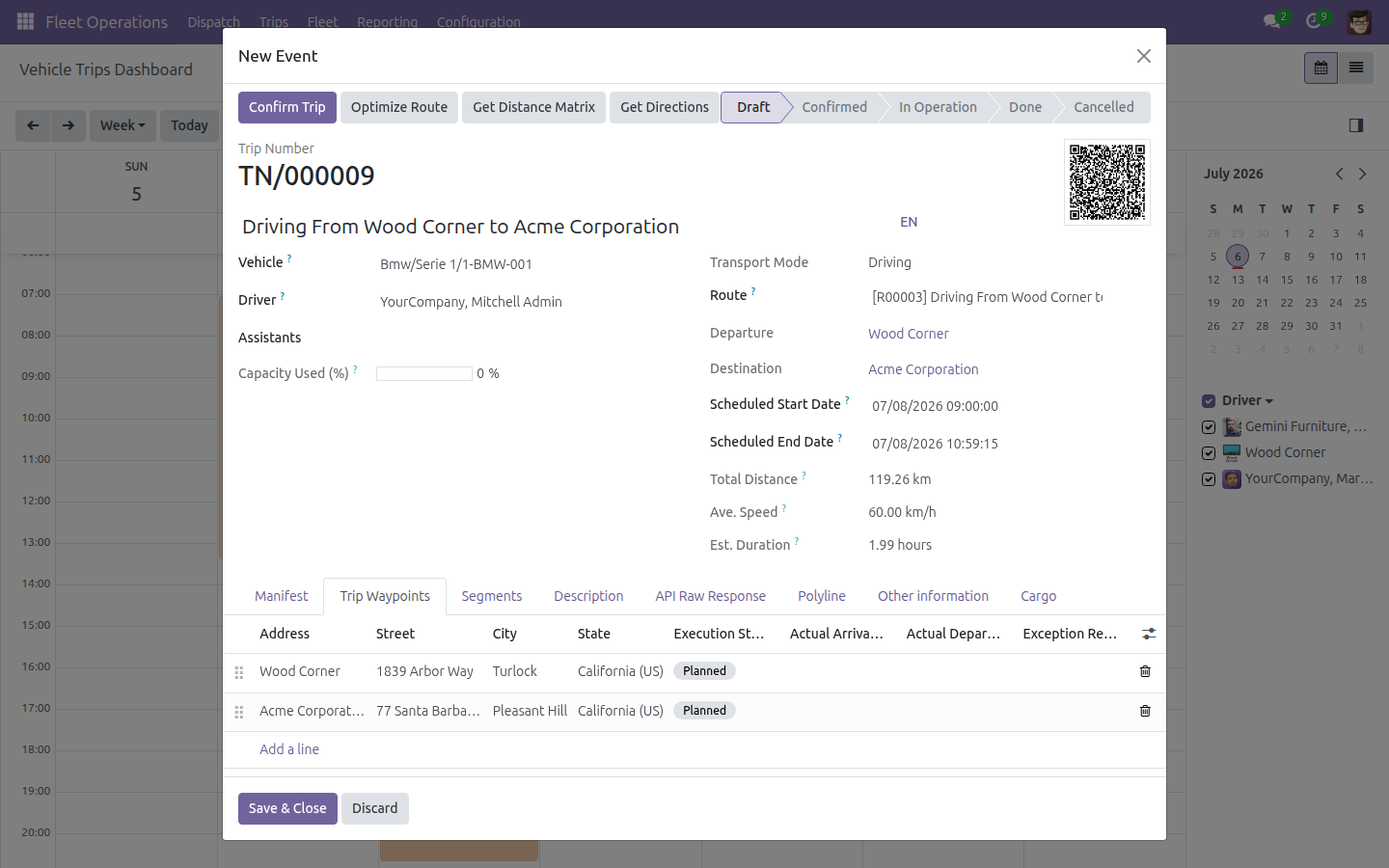
Plan a trip from a calendar: pick the vehicle, driver and one or more assistants, attach a reusable Geo-Route, then Optimize Route, Get Distance Matrix and Get Directions to compute per-stop ETA/ETD and per-segment distance and duration before you confirm.

🚗

Reusable routes, waypoints and per-vehicle VRP rules

Maintain reusable geo-routes and waypoints as master data, and configure each vehicle’s routing limits — depot end address, working calendar, maximum route duration and default per-stop service time — that bound what the auto-planner is allowed to schedule.

💰

Per-stop and per-route cost tracking

Pin every vehicle cost to the exact trip, route section and waypoint where it was incurred. Instead of one trip-level total, you get a true per-stop and per-route cost breakdown — with a guardrail that blocks a cost from being attached to a stop that isn’t on the trip.

📈

Planned-vs-actual analytics

Completed-trip worklists and the Trip Analysis pivot surface actual vs planned distance, time deviation and fuel efficiency, with route, section and waypoint filters — so managers can see exactly where routes drift from plan.

Benefits

Cut planning time from hours to minutes. One screen replaces spreadsheet juggling: auto-plan the board, review the proposal, batch-confirm — and every affected vehicle’s capacity updates on the spot.

Drivers execute the plan without training. A single adaptive button and four big exception buttons mean a new driver can run a full trip on their phone with no manual, while every timestamp and GPS point flows back automatically.

Never over-load a vehicle. Live capacity bars aggregate each booking’s weight and volume against the vehicle’s limits, so dispatchers catch an over-capacity route before it leaves the depot.

See where reality diverges from the plan. Per-stop timestamps and planned-vs-actual analytics turn every completed trip into evidence you can act on — distance deviation, time deviation and fuel consumption, sliced by route.

Know the true cost of each route. Per-waypoint and per-segment cost attribution reveals which stops and which legs actually cost you money, not just a blended trip total.

Auto-plan the whole board

The Dispatch Board: unassigned bookings on the left, vehicle trip board on the right, one click to auto-plan every route.

The Dispatch Board with unassigned bookings and the vehicle trip board

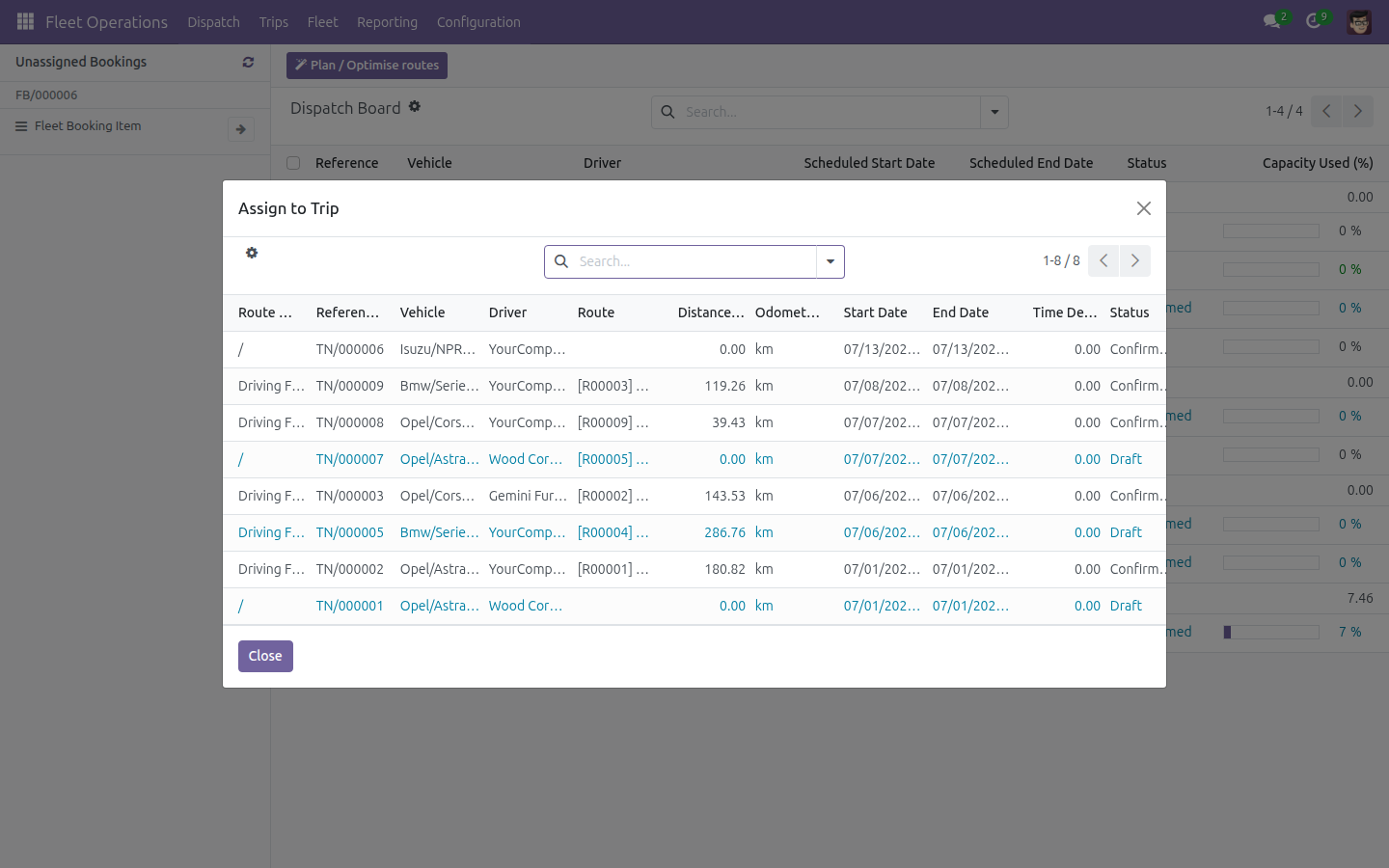
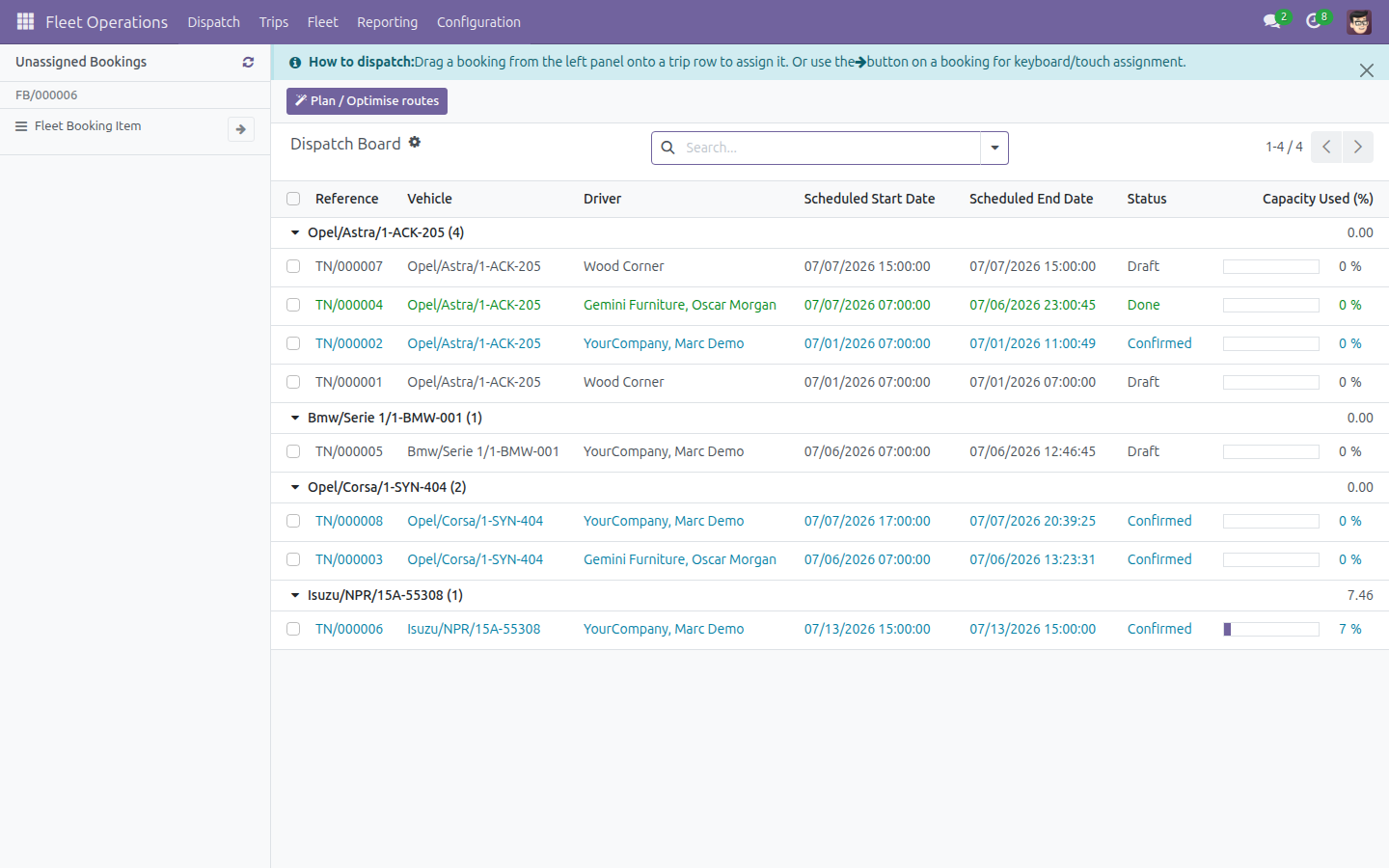
Assign a booking by hand

Assigning a single unassigned booking to an existing trip through the themed trip picker, a touch and keyboard alternative to drag-and-drop.

Assigning a booking to a trip through the themed trip picker

Plan a route-optimized trip

Planning a trip from the calendar: vehicle, driver, assistants and a Geo-Route, with Optimize Route computing per-stop ETA/ETD and per-segment distance.

Optimize Route computing per-stop ETA/ETD on a trip

Guide the driver stop by stop

The driver’s My Trips screen guiding one active stop with a single adaptive primary button, GPS stamped on every action.

Driver My Trips screen with one adaptive primary button

Report a failed stop in one tap

The driver exception dialog with four big tap targets — Recipient absent, Refused, Closed, Other — to mark a stop Failed on the spot.

Driver exception dialog with four reason buttons

See Fleet Operations in Action

Watch the Dispatch Board auto-plan a route, then follow a driver through My Trips.

Try the Live Demo

Need help with Fleet Operations?

Pre-Sales & Partnership

apps.support@viindoo.com

Technical Support

apps.support@viindoo.com

Technical Requirement

  • Odoo version: 17.0
  • Editions: Community / Enterprise
  • Required modules: Fleet Booking & Trip Management, Viindoo Unified Routing Framework (Geo-Routes), Partner Working Calendar
  • Additional dependency: Google OR-Tools (Python package, installed automatically) powers the route-optimization engine
  • License: OPL-1

Who Should Use This Module?

Fleet Operations Manager / Dispatcher

Auto-plans and assigns bookings on the Dispatch Board, reviews optimizer proposals, and manages the Confirmed, In Operation and Done trip worklists.

Driver

Runs their assigned trip stop by stop from the mobile My Trips screen and reports exceptions in one tap.

Fleet Manager / Analyst

Configures per-vehicle VRP rules and reusable routes, and analyzes planned-vs-actual distance, time deviation and cost by route in the reporting pivots.

Ready to give your dispatch desk a real cockpit?

Install Fleet Operations and turn unassigned bookings into optimized, trackable trips today.

Viindoo — Powering Your Business Growth.