

E-Invoice - VNIs VN-Invoice Integrator
| Lines of Code | 1536 |
| Technical name | l10n_vn_viin_accounting_vninvoice |
| License | OPL-1 |
| Website | https://viindoo.com/apps/app/17.0/l10n_vn_viin_accounting_vninvoice |
| Read description for | v 15.0 v 16.0 v 18.0 |
| Required Apps | Invoicing (account) Discuss (mail) |
| Included Dependencies | Vietnamese E-Invoice Integration Vietnam E-Invoice Replacement Partner Budget Code Partner Identity Information Viindoo Base Viindoo Accounting Legal Invoice Number |
| Extensions | VN-Invoice: Summary Option for Flexible E-Invoice Issuing |

E-Invoice - VNIs VN-Invoice Integrator
Integrates with VN-Invoice service to issue legal e-Invoice
Key Features
Built natively on Odoo/Viindoo to streamline real business operations:
Integrate with VN-Invoice
to issue VN-Invoice from the invoice created from the *accounting software*.
Generate Representation Version (PDF, XML) of the issued invoice and store it for later download
Generate Converted Version of the issued invoice and store it for later download
Cancel issued VN-Invoices
Automatically download Converted and Representation files of issued VN-Invoices
*Manage invoices* based on VN-Invoice status
- Not Issued: invoices that have no corresponding VN-Invoice issued.
- Issued and not Paid: invoices that have corresponding VN-Invoice issued but not set as paid.
- Paid: invoices that have corresponding VN-Invoice issued and paid.
- Issued but Canceled: invoices that have corresponding VN-Invoice issued but canceled already.
Easy to define and manage invoice series, invoice templates, invoices type according to the government rules
Invoice serial can be set for companies (in Accounting > Configuration > Settings) and account journals
- Support multi-company environment for different invoice serials.
- Support multiple invoicing serials for the same company: you can issue invoices with different serials that you have registered with.
VN-Invoice and accepted by the government authority.
Invoice template can be set for companies (in Accounting > Configuration > Settings) and account journals
- Support multi-company environment for different invoice template.
- Support multiple invoicing templates for the same company: you can issue invoices with different template that you have registered with.
VN-Invoice and accepted by the government authority.
Invoice type can be set for companies (in Accounting > Configuration > Settings) and account journals
- Support multi-company environment for different invoice types.
- Support multiple invoicing types for the same company: you can issue invoices with different types that you have registered with.
VN-Invoice and accepted by the government authority.
Send Invoice and attache VN-Invoice instead of the default invoice template
Customer Portal
- Customers can download a display version of VN-Invoice in PDF format with a file that complies with the EU's Factur-X standard, which they can import into their own system.
- Customer can print the display version of the VN-Invoice.
- Customers can download an XML version of VN-Invoice so they can import any software that supports VN-Invoice XML.
Support Sandbox mode for your testing before launching in production
Issuing invoices in chronological order
when you issue a VN-Invoice, the software will automatically search for invoices that have been entered before the date of the current invoice but have not yet been issued VN-Invoices and request you to issue that VN-Invoice first.
Provide support instruction at every step you take
This makes it easier for you to resolve issues before reaching out to tech-support.
Support multilingual for issuing to foreign customers according to the government rules: invoice must be presented in Vietnamese and may have another language additionally
Benefits
Simplify adherence to government regulations, reducing the risk of penalties.
Automate invoicing processes, minimizing manual errors and saving time.
Track and monitor the status of issued invoices for better clarity and accountability.
Effortlessly manage invoice series, templates, and types across different companies.
Offer customers easy access to compliant invoices in their preferred format.
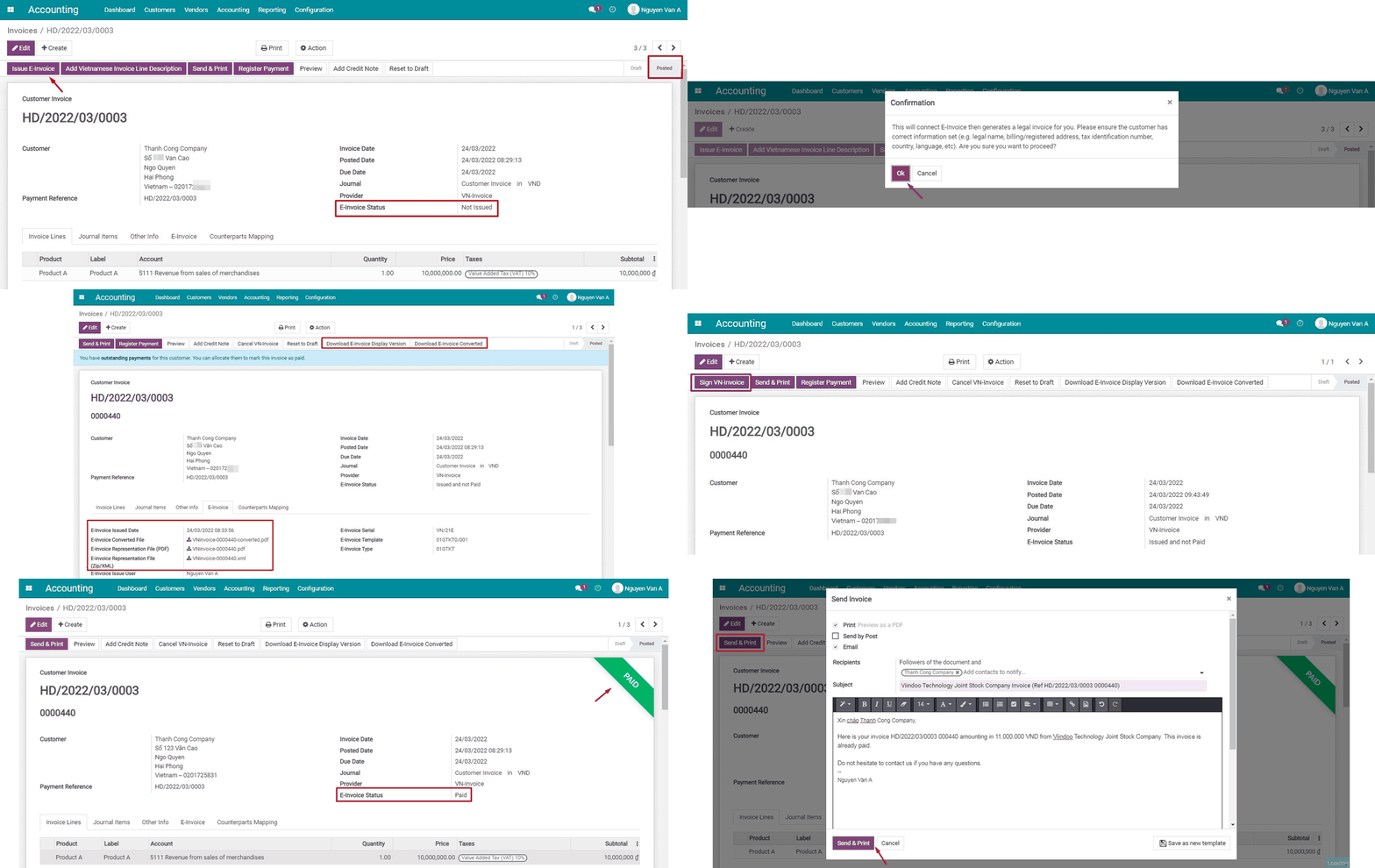
Issue E-invoice
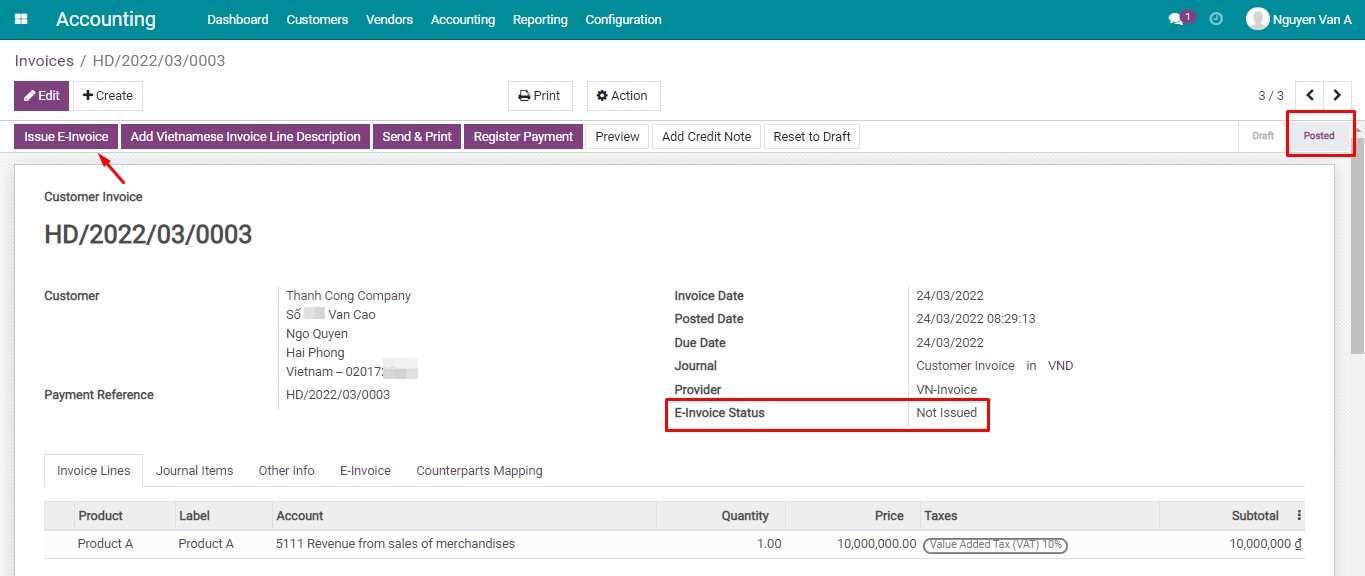

Agree on issuing E-invoice
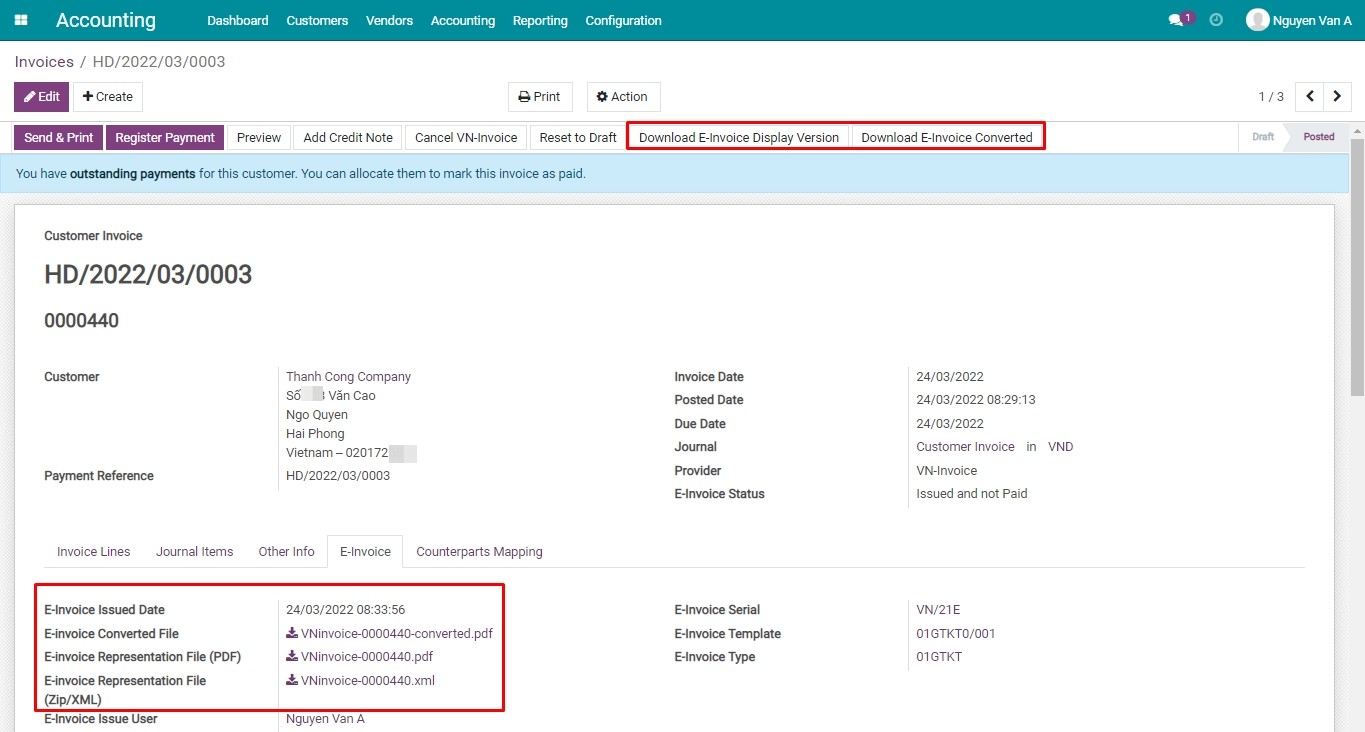
Download E-Invoice
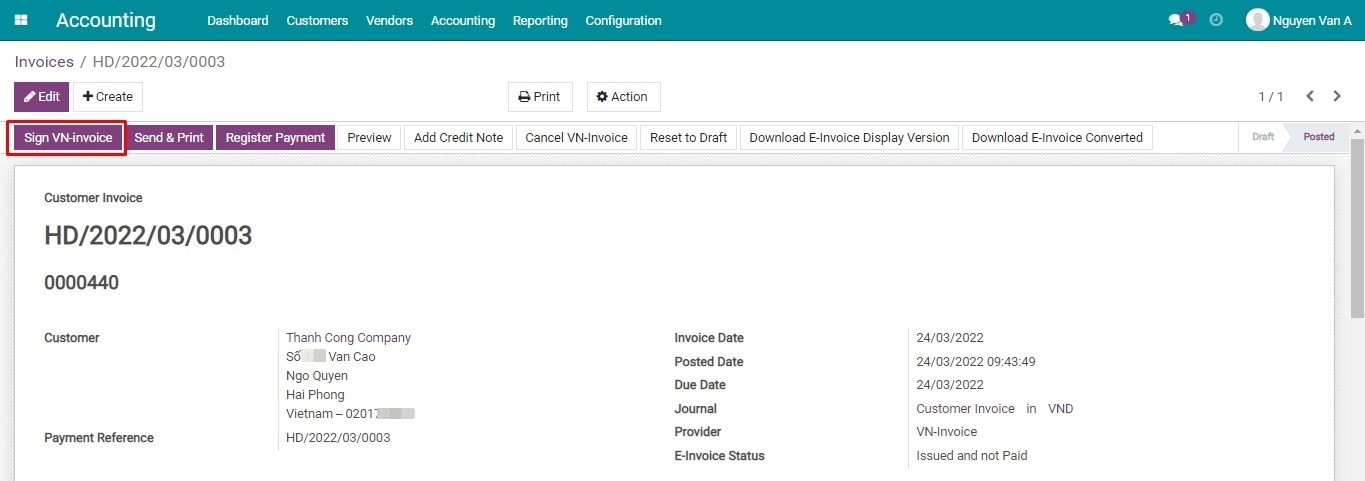
Sign VN-Invoice
Reconciling after payment
Send E-Invoice to the customer
See E-Invoice - VNIs VN-Invoice Integrator in Action
See how this module solves real business problems in a working Viindoo environment.
Need help with E-Invoice - VNIs VN-Invoice Integrator?
For questions, implementation support, or consulting services, contact Viindoo.
Pre-Sales & Partnership
When contacting us, please include:
- Odoo/Viindoo version (CE/EE).
- Number of users and business scope.
- Other modules currently in use.
Technical Support
For faster troubleshooting, please provide:
- Order number or app reference.
- Odoo/Viindoo version & edition.
- Steps to reproduce the issue.
- Screenshots/logs if available.
Technical Requirement
Changes log
We continuously improve this module. Recent updates from the official Viindoo repository:
- 2025-09-11 Added Identification, passport, budget code for Vietnam edi.
- 2025-08-15 Fixed Wrong taxable amount.
- 2025-07-22 Improved Correct vninvoice stuff.
- 2025-06-13 Fixed BuyerLegalName is require when have taxcode.
- 2025-06-09 Fixed Only get positive tax amount when needed, correct meinvoice data.
- 2025-05-06 Fixed Tax code for personal is optional.
Works Great With These Modules
Extend E-Invoice - VNIs VN-Invoice Integrator with complementary Viindoo apps:
VN-Invoice: Summary Option for Flexible E-Invoice Issuing
Flexibly issue VN-Invoice e-invoices in detailed or aggregated formats to simplify your invoicing process.
Module l10n_vn_viin_accounting_vninvoice_summaryWho Should Use This Module?
Built for teams that need this capability fully integrated into their Odoo/Viindoo stack.
Accounting Managers
Ensure compliance with state regulations while simplifying invoice management.
Multi-Company Businesses
Streamline invoicing across subsidiaries or branches.
Companies Using VN-Invoice Services
Leverage VN-Invoice integration for efficient and compliant e-invoicing.
Installation
- Navigate to Apps.
- Search with keyword l10n_vn_viin_accounting_vninvoice.
- Press Install.
Instruction
Instruction video: VN-Invoice
Declare the integration information
You can declare E-invoice information by navigating to Accounting > Configuration > E-Invoice.
Issue E-invoice
Follow the steps below to issue an e-invoice.
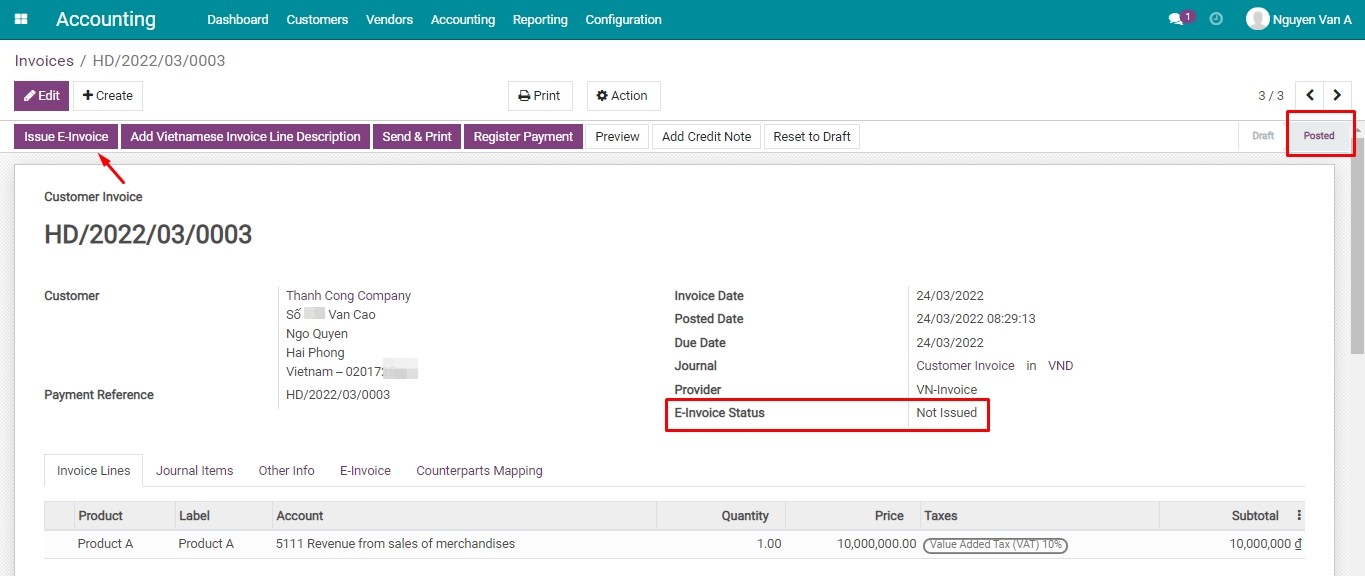
- Issue VN-Invoice:

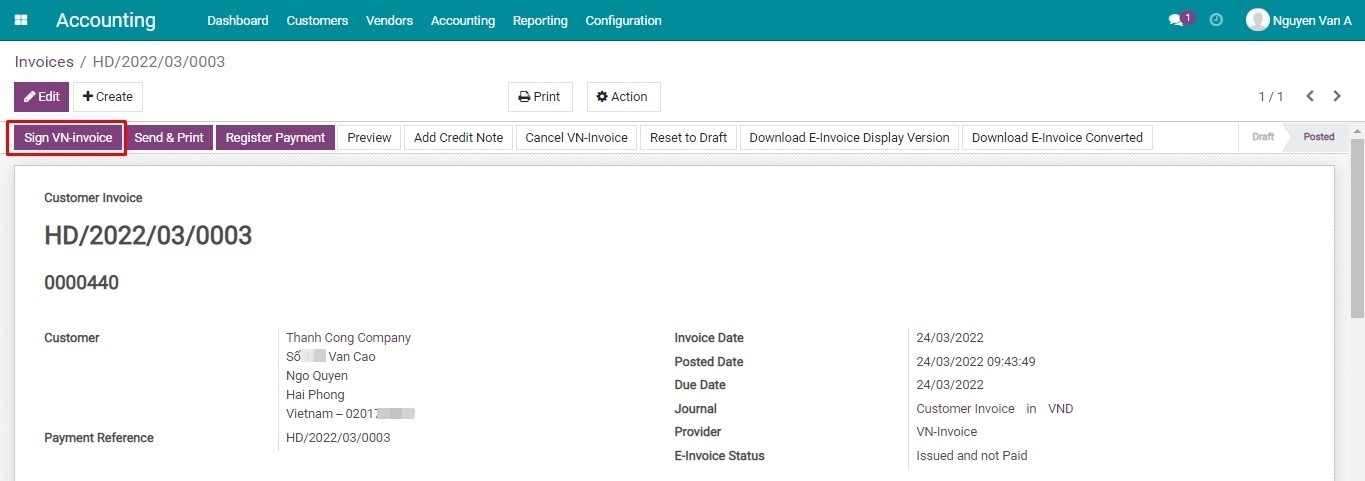
- Sign VN-Invoice:
- Download the Display/Converted E-Invoice:
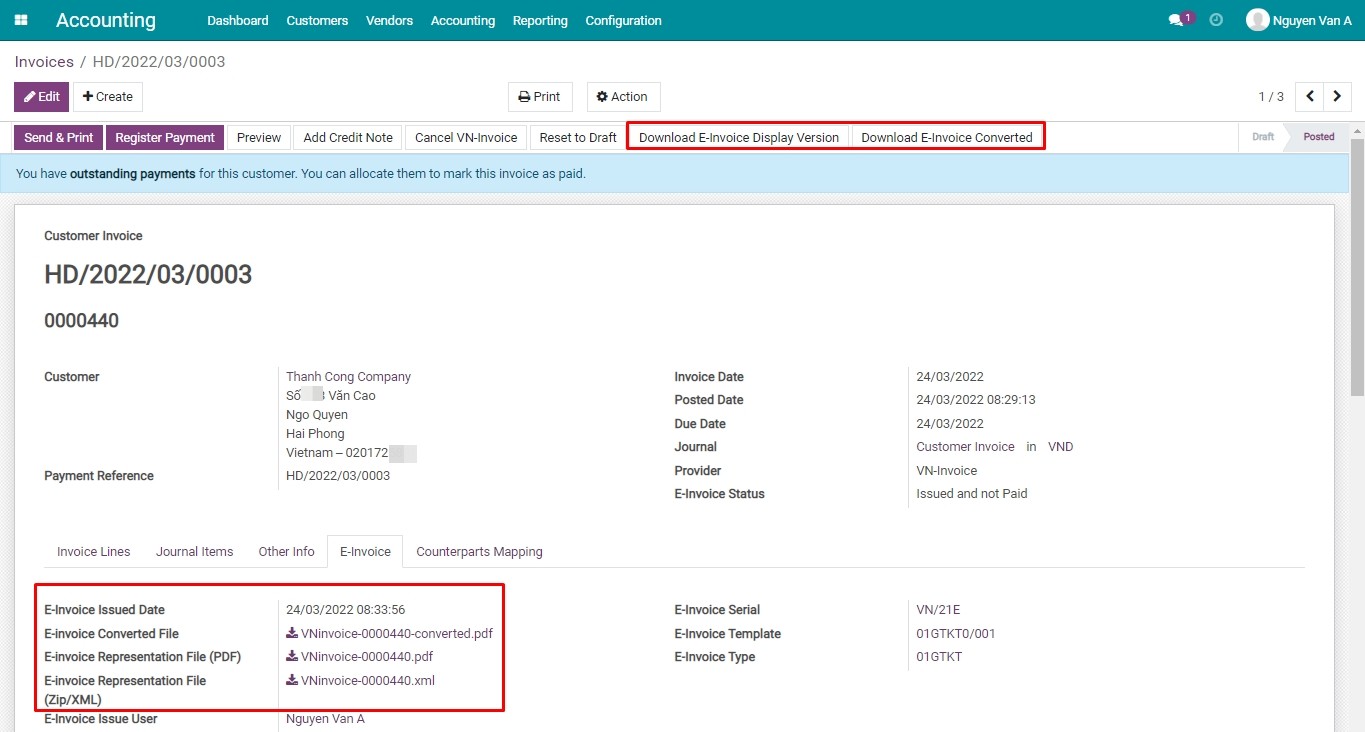
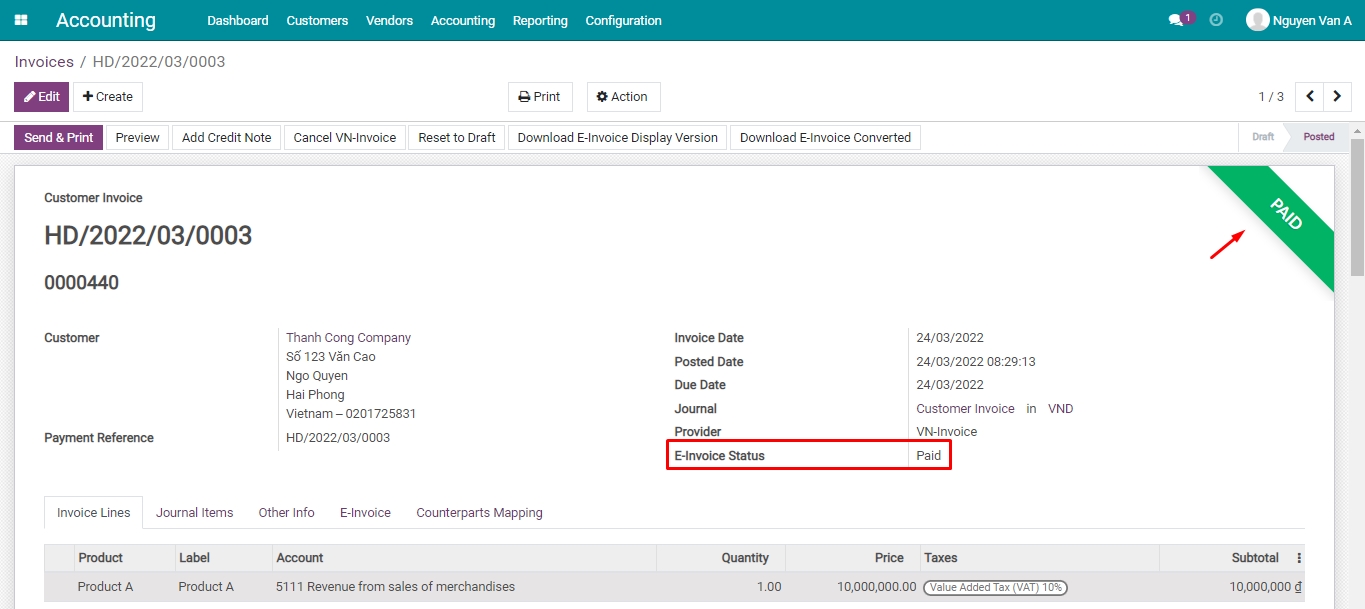
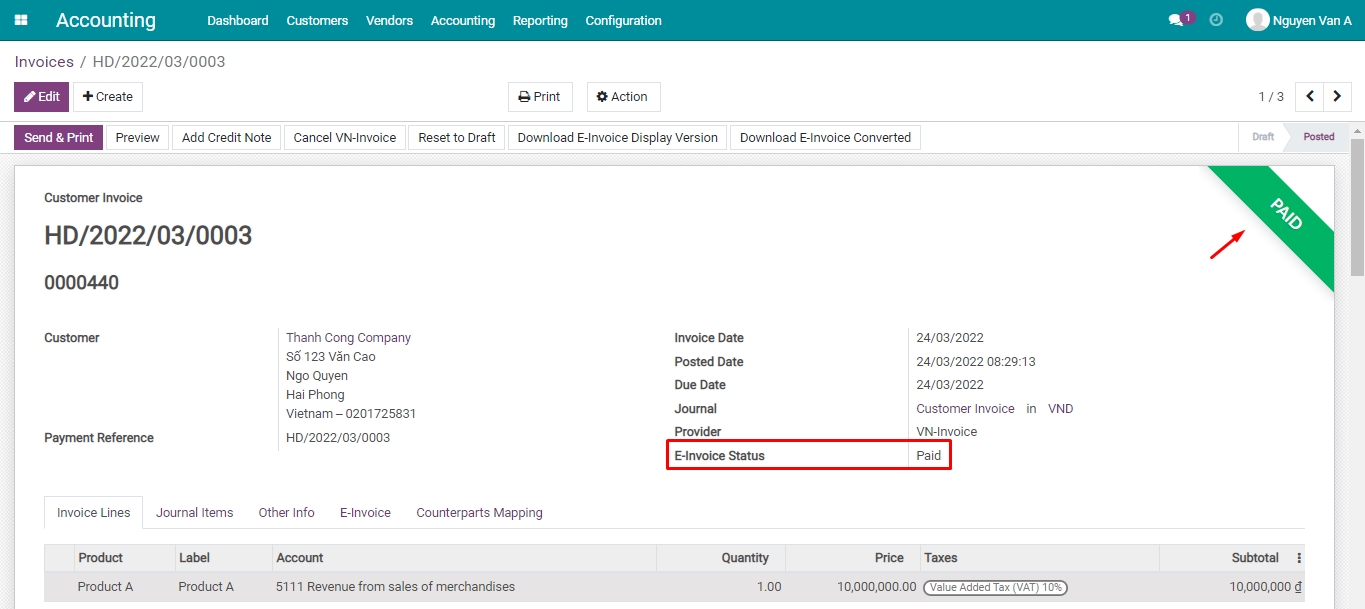
- Reconciling after payment: after the invoice is reconciled, the software will display:
- Paid customer invoice in the system,
- Paid E-Invoice Status, in accordance with the VN-Invoice on the VNIs system.
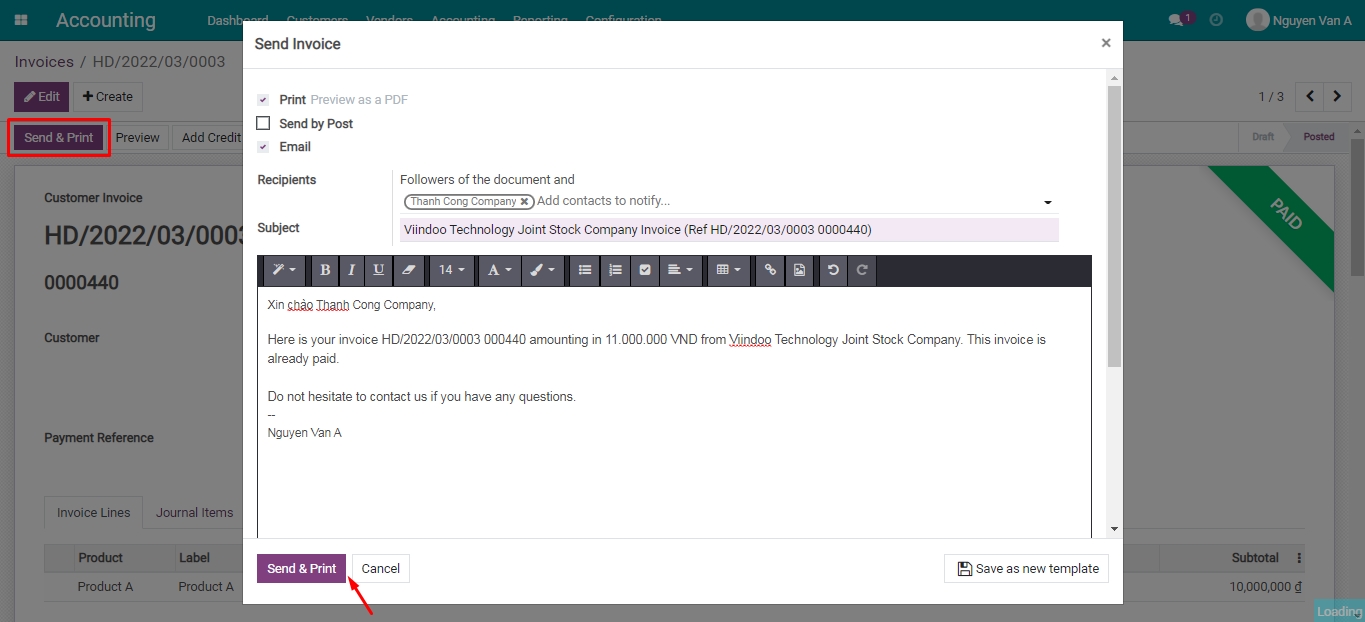
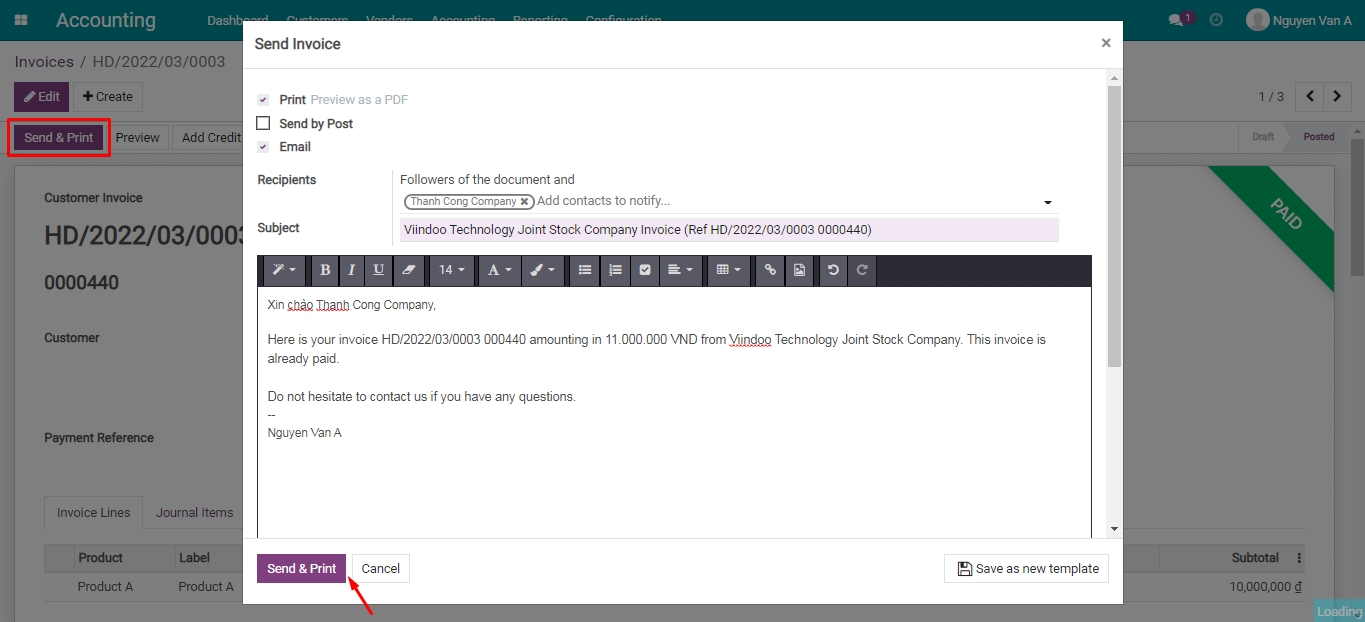
- Send E-Invoice to the customer:
Issued Vn-Invoice cancelation in Viindoo
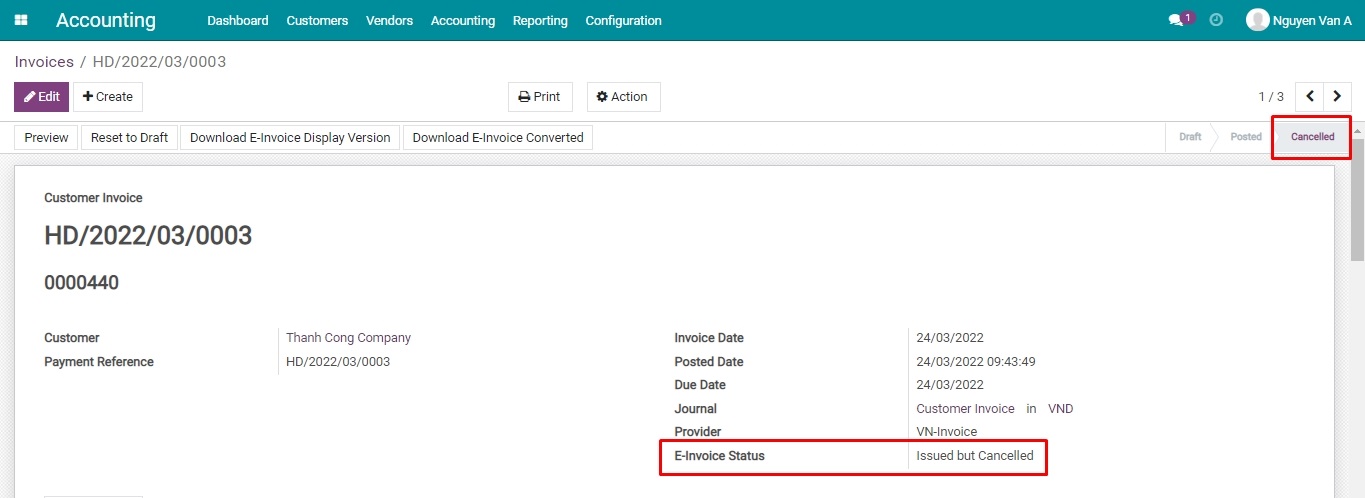
In case the VN-Invoice has been issued and errors are detected, you can cancel the issued VN-Invoice right on the Viindoo Accounting software:
After canceling, the system will display the:
- Customer invoice with the Cancelled status;
- E-Invoice with the Issued but Cancelled status, in accordance with the VN-Invoice on the VNIs system.
This software and associated files (the "Software") may only be used (executed, modified, executed after modifications) if you have purchased a valid license from the authors, typically via Odoo Apps, or if you have received a written agreement from the authors of the Software (see the COPYRIGHT file).
You may develop Odoo modules that use the Software as a library (typically by depending on it, importing it and using its resources), but without copying any source code or material from the Software. You may distribute those modules under the license of your choice, provided that this license is compatible with the terms of the Odoo Proprietary License (For example: LGPL, MIT, or proprietary licenses similar to this one).
It is forbidden to publish, distribute, sublicense, or sell copies of the Software or modified copies of the Software.
The above copyright notice and this permission notice must be included in all copies or substantial portions of the Software.
THE SOFTWARE IS PROVIDED "AS IS", WITHOUT WARRANTY OF ANY KIND, EXPRESS OR IMPLIED, INCLUDING BUT NOT LIMITED TO THE WARRANTIES OF MERCHANTABILITY, FITNESS FOR A PARTICULAR PURPOSE AND NONINFRINGEMENT. IN NO EVENT SHALL THE AUTHORS OR COPYRIGHT HOLDERS BE LIABLE FOR ANY CLAIM, DAMAGES OR OTHER LIABILITY, WHETHER IN AN ACTION OF CONTRACT, TORT OR OTHERWISE, ARISING FROM, OUT OF OR IN CONNECTION WITH THE SOFTWARE OR THE USE OR OTHER DEALINGS IN THE SOFTWARE.
