

Sales Payment Tracking and Cohort Reports
| Lines of Code | 891 |
| Technical name | viin_sale_ee |
| License | OPL-1 |
| Website | https://viindoo.com/apps/modules/18.0/viin_sale_ee |
| Read description for | |
| Required Apps | Invoicing (account) Discuss (mail) |
| Included Dependencies | Viindoo Base Accounting Foundation Sales Reports Activate Product Features Viin Cohort View |
Sales Payment Tracking and Cohort Reports
Track how much cash has really landed against each sales order line, and analyse sales cohorts.
Knowing an order has been invoiced is not the same as knowing it has been paid. This module answers the second question, down to the individual order line, so sales and finance always agree on where the cash actually stands.
Key Features
Seven ways this module sharpens the sales order and its reporting - from a real, reconciled payment figure on every order to how fast orders close and what they were worth before discount.
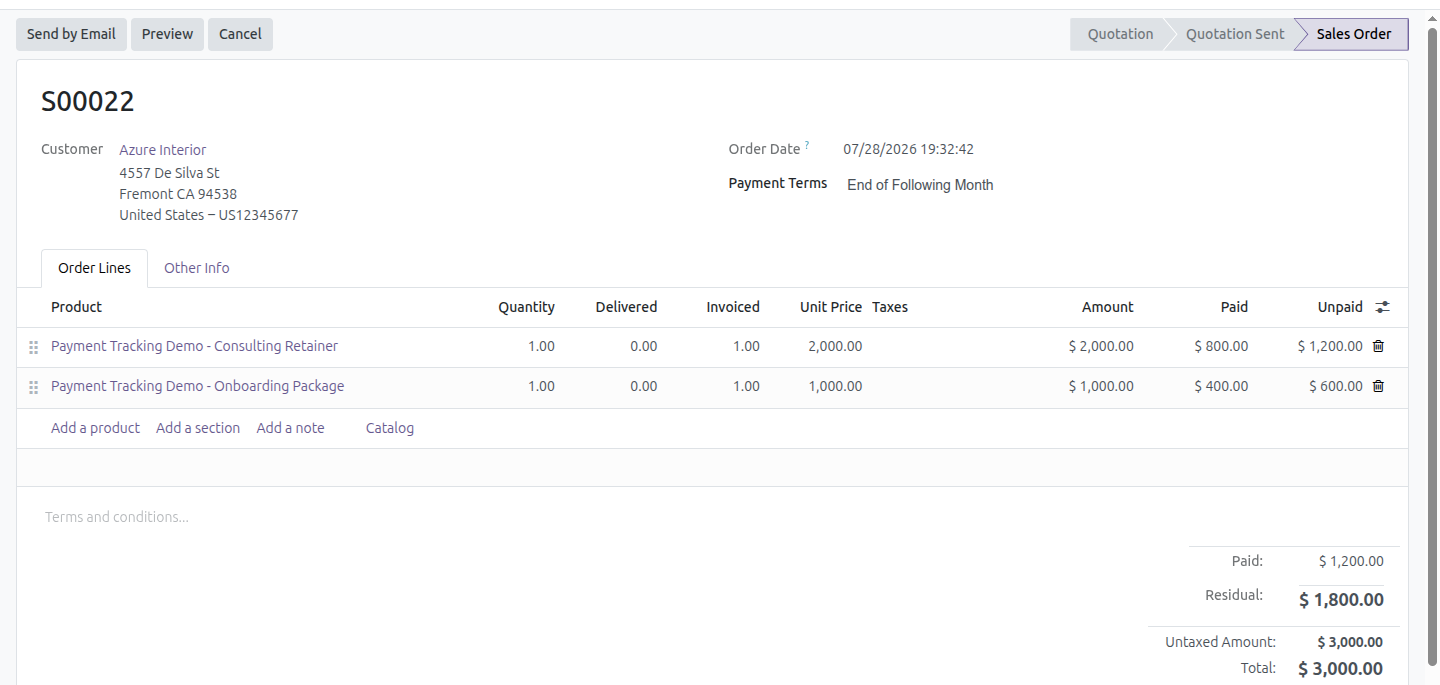
Paid & Unpaid on order lines
Two optional columns on the sales order lines, so a partially settled order can be read line by line.
Paid & Residual on the order total
The order form's totals block adds Paid and Residual right next to the order total, at a glance.
Paid & Unpaid on the orders list
The same two columns, plus column totals, on the Quotations/Orders list - scan a whole batch at once.
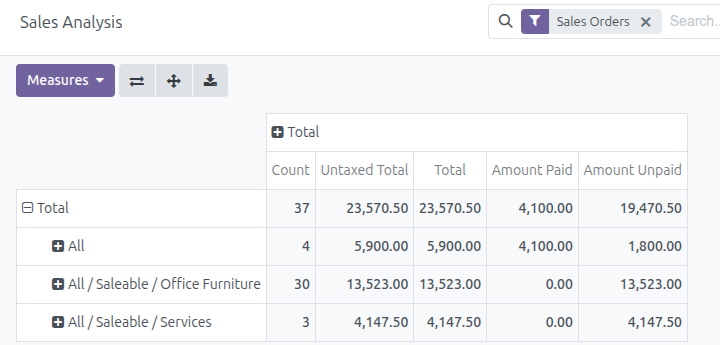
Payment measures in Sales Analysis
Amount Paid and Amount Unpaid join the graph, pivot and Sales Analysis report, converted to company currency.
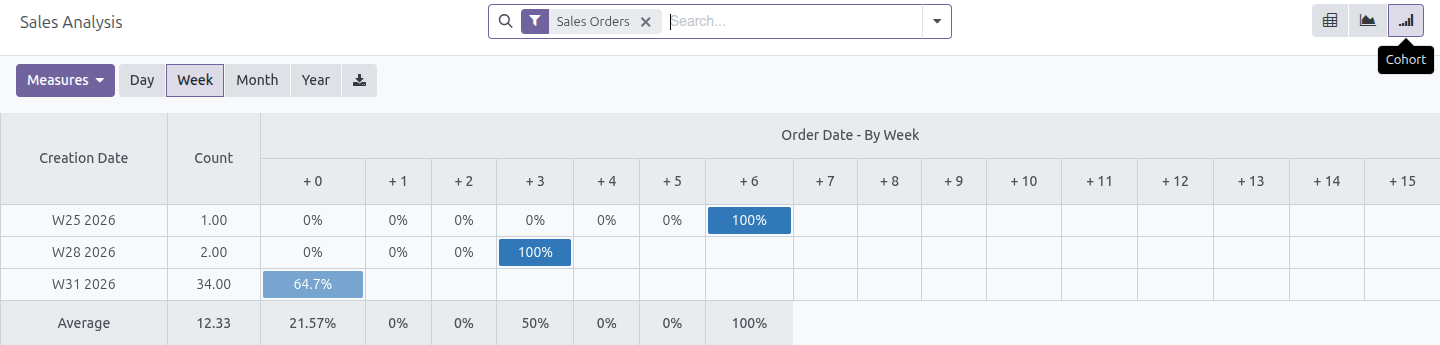
Cohort view on the dashboard
A cohort view sits alongside the graph and pivot on Reporting / Dashboard, to follow order churn week by week.
Days To Confirm
A Sales Analysis measure counting the days from order creation to confirmation, so closing speed can be tracked per salesperson, customer or period.
Total before discount
Whenever an order carries a discount, the pre-discount total appears struck through in the order form totals and on the quotation and sales order PDF - so the customer sees what was given away.
Figures You Can Trust
The numbers follow the money wherever it goes, not just the paperwork trail.
See Paid and Unpaid line by line
Turn on the Paid and Unpaid columns on any order's lines to read a partially settled order the way finance sees it - which line is covered, and which is still owed.
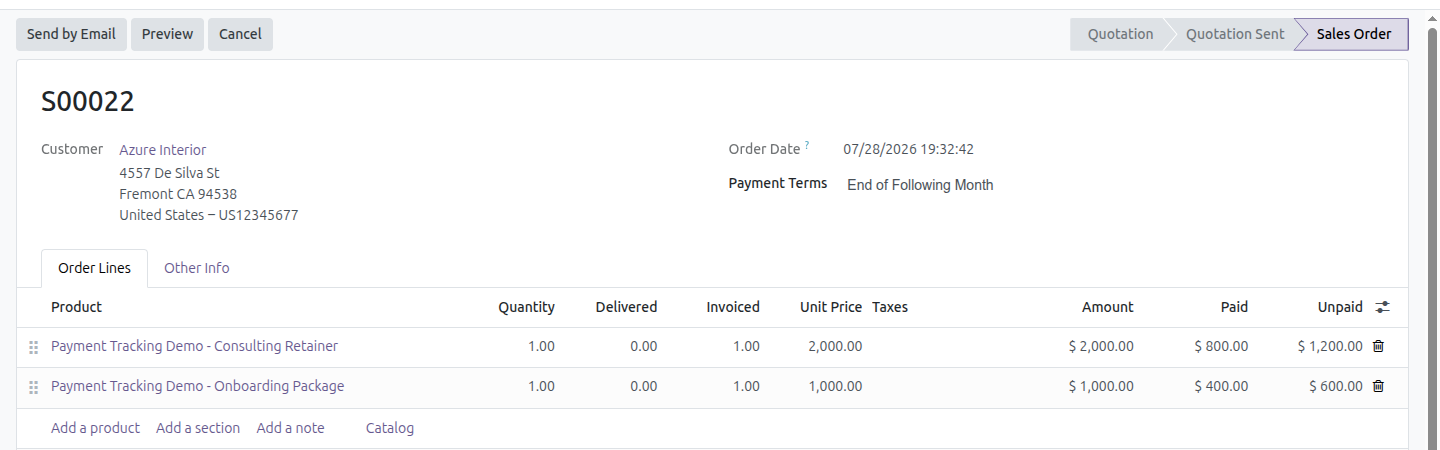
Paid and Residual on the order form
Next to the order's Total, a Paid and a Residual figure make the cash position obvious without opening a single invoice.

Payment measures in Sales Analysis
Amount Paid and Amount Unpaid become regular measures on the Sales Analysis pivot and graph, grouped, filtered and exported exactly like every other measure.
Cohort view on the dashboard
A weekly cohort, right next to the graph and pivot on Reporting / Dashboard, tracks how each batch of orders behaves over time.
Need help with this module?
For questions, implementation support, or consulting services, contact Viindoo.
Pre-Sales & Partnership
When contacting us, please include:
- Odoo/Viindoo version (CE/EE).
- Number of users and business scope.
- Other modules currently in use.
Technical Support
For faster troubleshooting, please provide:
- Order number or app reference.
- Odoo/Viindoo version & edition.
- Steps to reproduce the issue.
- Screenshots/logs if available.
Technical Requirement
Who Should Use This Module?
Built for anyone who needs to answer "has this actually been paid?" without leaving the Sales app.
Sales Managers
See at a glance which confirmed orders are still waiting on cash, without opening every invoice one by one.
Accounts Receivable & Finance
Check what sales believes is outstanding against the real, reconciled invoice state - down to the order line.
Odoo/Viindoo Partners & Implementers
Add production-ready payment visibility and cohort analysis to a sales cluster without building the reconciliation logic yourself.
This software and associated files (the "Software") may only be used (executed, modified, executed after modifications) if you have purchased a valid license from the authors, typically via Odoo Apps, or if you have received a written agreement from the authors of the Software (see the COPYRIGHT file).
You may develop Odoo modules that use the Software as a library (typically by depending on it, importing it and using its resources), but without copying any source code or material from the Software. You may distribute those modules under the license of your choice, provided that this license is compatible with the terms of the Odoo Proprietary License (For example: LGPL, MIT, or proprietary licenses similar to this one).
It is forbidden to publish, distribute, sublicense, or sell copies of the Software or modified copies of the Software.
The above copyright notice and this permission notice must be included in all copies or substantial portions of the Software.
THE SOFTWARE IS PROVIDED "AS IS", WITHOUT WARRANTY OF ANY KIND, EXPRESS OR IMPLIED, INCLUDING BUT NOT LIMITED TO THE WARRANTIES OF MERCHANTABILITY, FITNESS FOR A PARTICULAR PURPOSE AND NONINFRINGEMENT. IN NO EVENT SHALL THE AUTHORS OR COPYRIGHT HOLDERS BE LIABLE FOR ANY CLAIM, DAMAGES OR OTHER LIABILITY, WHETHER IN AN ACTION OF CONTRACT, TORT OR OTHERWISE, ARISING FROM, OUT OF OR IN CONNECTION WITH THE SOFTWARE OR THE USE OR OTHER DEALINGS IN THE SOFTWARE.
