

Accounting Reports - Vietnam Accounting
| Lines of Code | 11358 |
| Technical name | l10n_vn_viin_account_reports |
| License | OPL-1 |
| Website | https://viindoo.com/apps/modules/19.0/l10n_vn_viin_account_reports |
| Read description for | v 10.0 v 11.0 v 12.0 v 13.0 v 14.0 v 15.0 v 16.0 v 17.0 v 18.0 |
| Required Apps | Invoicing (account) Discuss (mail) |
| Included Dependencies | Accounting & Financial Reports Account Counterparts Viindoo Base Vietnam Chart of Accounts - Circular 99 and 133 Accounting Foundation Legal Invoice Number |
| Extensions | Accounting Reports - Vietnam Accounting - Foreign Trade Accounting Reports - Vietnam Accounting - Fixed Asset Disposals |
VAS templates for Vietnam
Vietnam Accounting Reports (VAS)
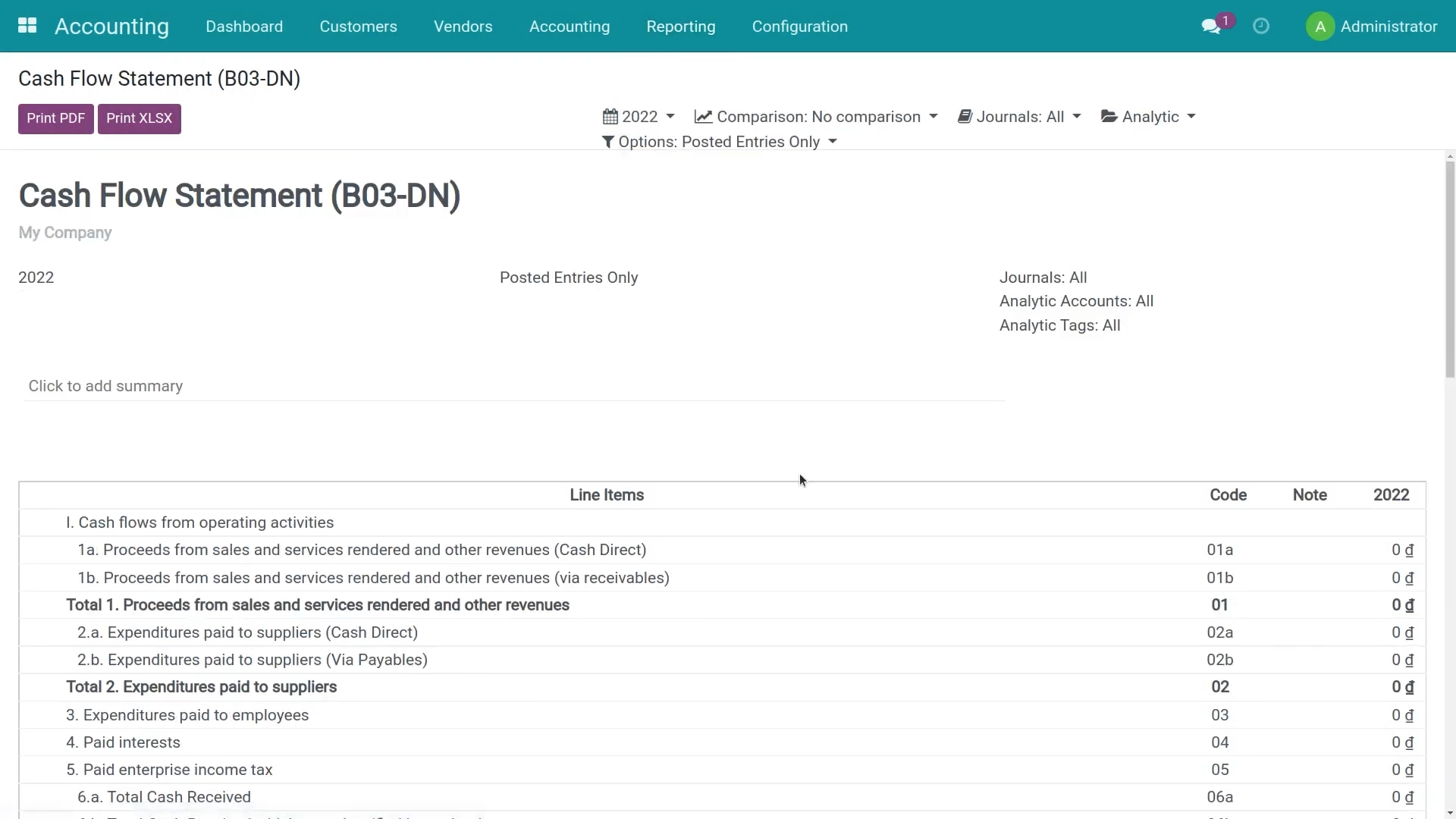
Prebuilt Balance Sheet (B01-DN), Profit & Loss (B02-DN), Cash Flow (B03-DN), VAT declarations (01-1/GTGT, 01-2/GTGT), and required ledgers/books that comply with Circular 99/2025/TT-BTC and Circular 133/2016/TT-BTC.
What this module does
Extends to_account_reports and l10n_vn_viin to provide Vietnam Accounting Standards reports required by the Ministry of Finance.
- VAS Chart of Accounts aligned with Circular 99/2025/TT-BTC and Circular 133/2016/TT-BTC.
- Financial statements: Balance Sheet (B01-DN), Profit & Loss (B02-DN), Cash Flow (B03-DN) for Circular 99 and Circular 133.
- Tax declarations: VAT listings 01-1/GTGT and 01-2/GTGT in Excel format (Circular 119/2014/TT-BTC).
- Audit-ready ledgers and books (S38, S03a, S03b, S07, S08) with PDF/XLSX export.
- Imported goods on the VAT return: import VAT and customs duty are declared on the customs declaration (Foreign Trade); the imported-goods value lines of the Tax Report (source of 01/GTGT [23]/[23a]) are computed from its vouchers, the customs duty is inside the import VAT base, and every figure opens the journal items behind it.
- Purchase list 01-2/GTGT lists every vendor bill in full, even when only part of its lines is spread over a VAT-section analytic account.
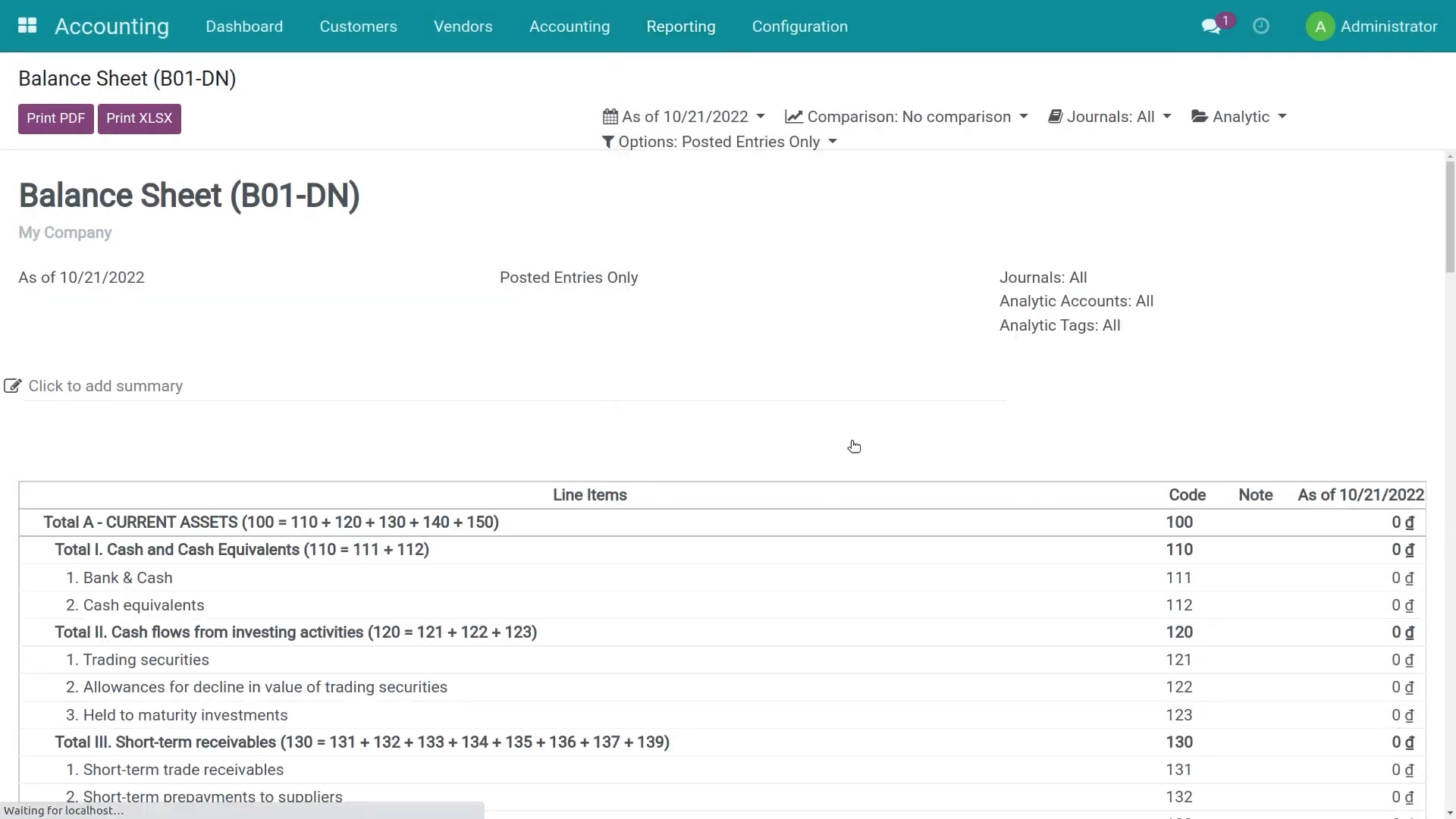
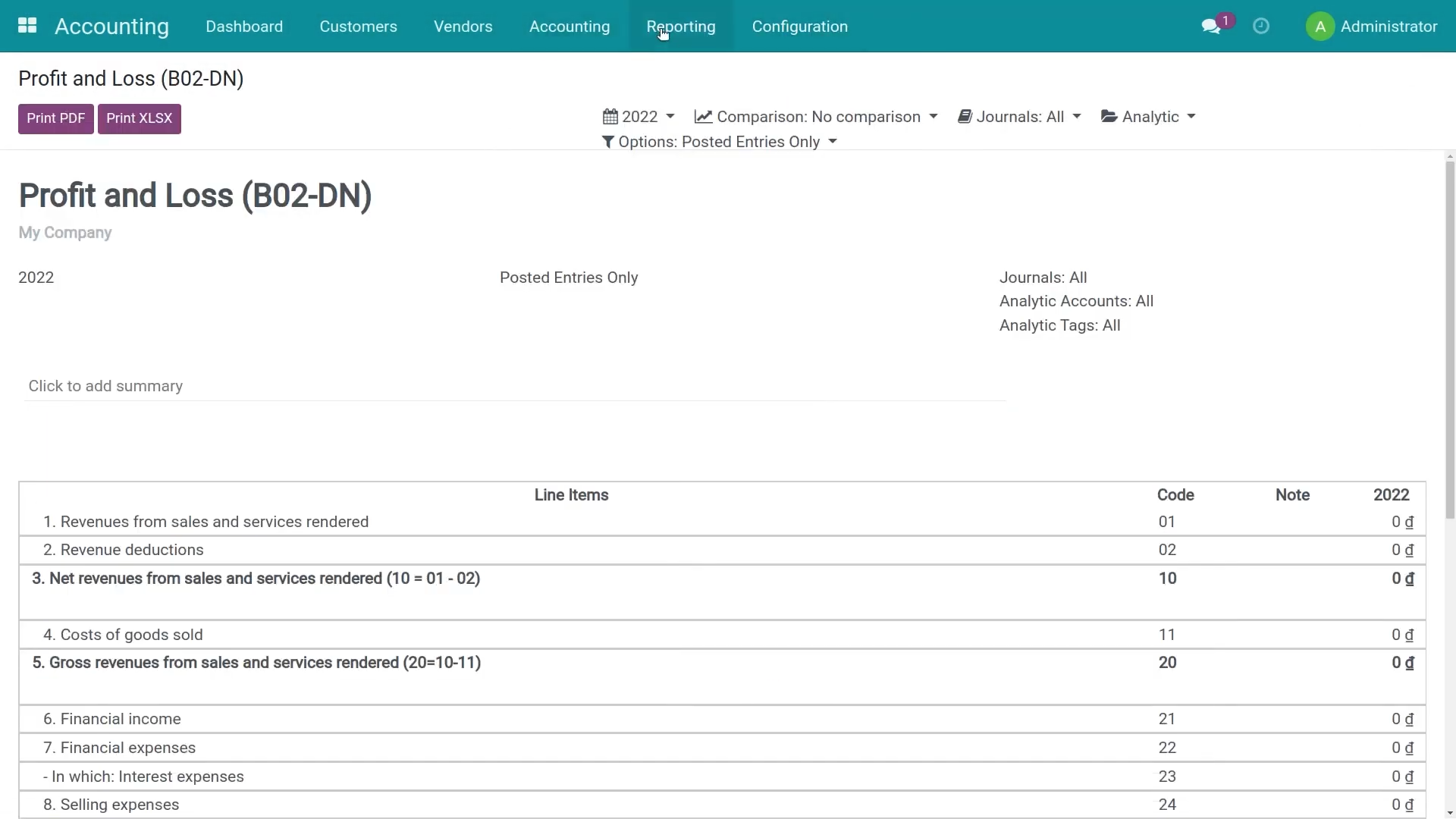
Vietnam Accounting Standards reports Balance Sheet, Income Statement, Cash Flow Statement, VAT declarations, and statutory ledgers/books with PDF/XLSX export.
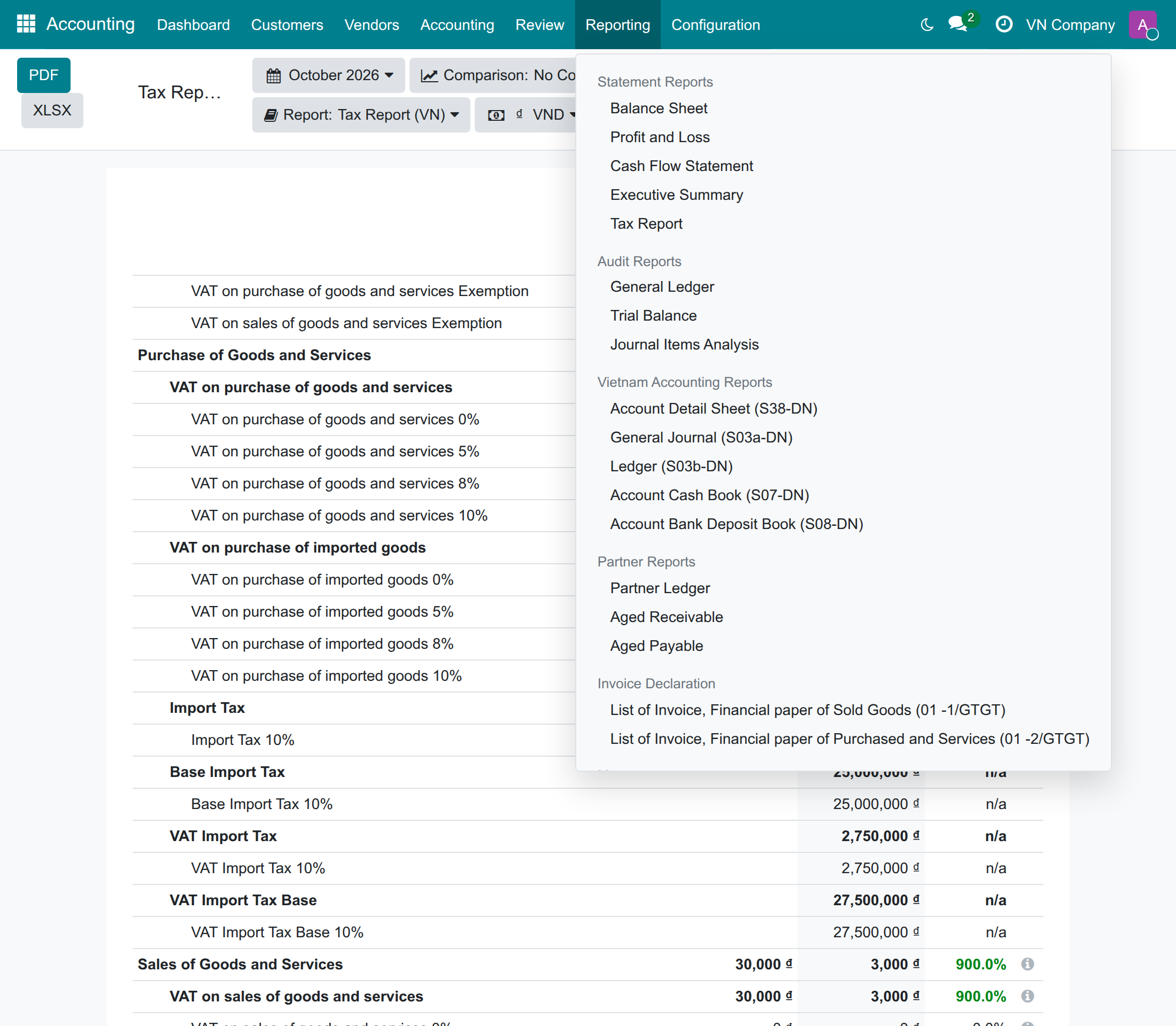
Imported goods on the VAT return Import VAT bases that include the customs duty, read from the customs declarations and traceable to the journal items.
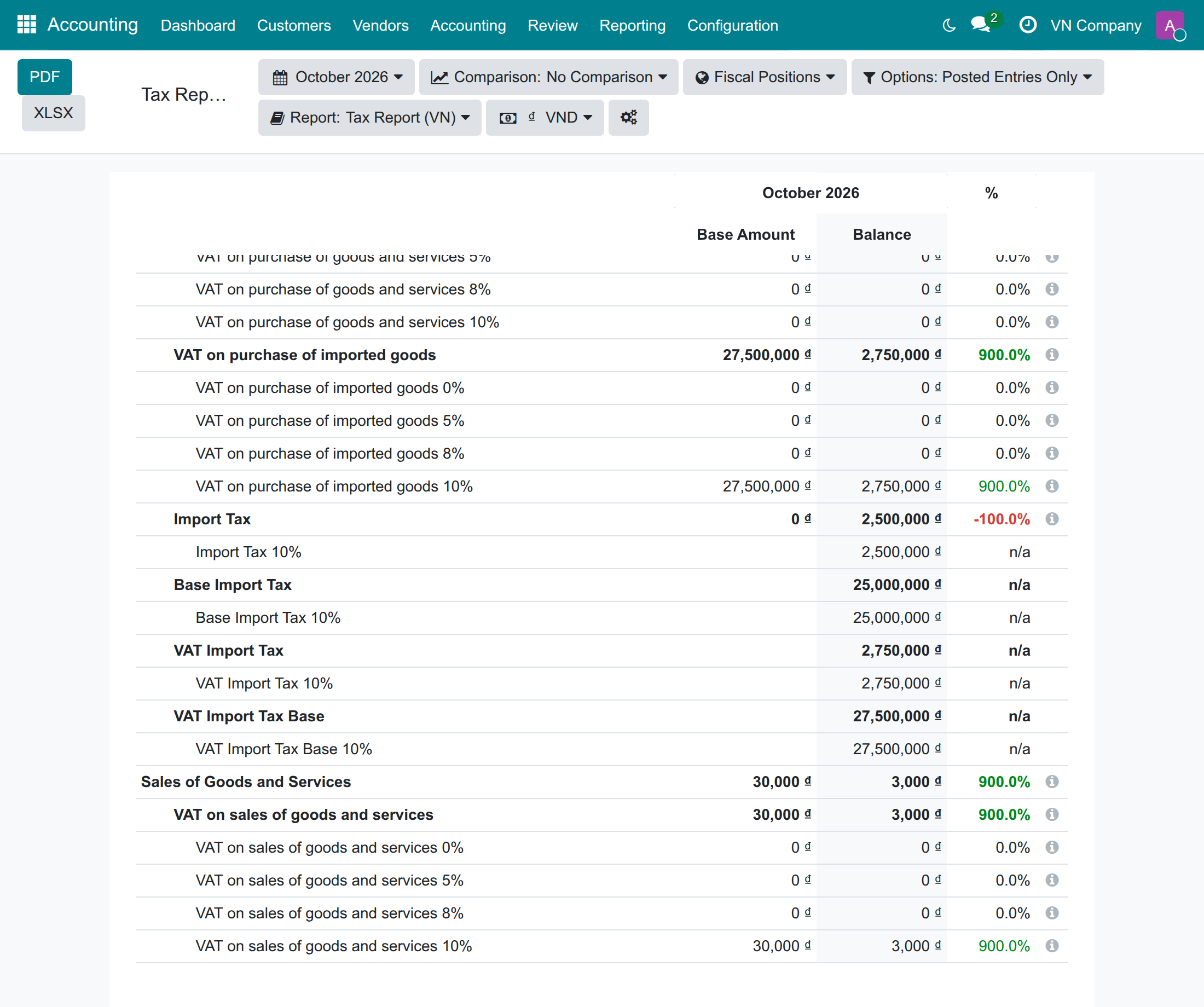
Imported-goods lines of the Tax Report: goods of 25,000,000 with 10% import duty give an import VAT base of 27,500,000.
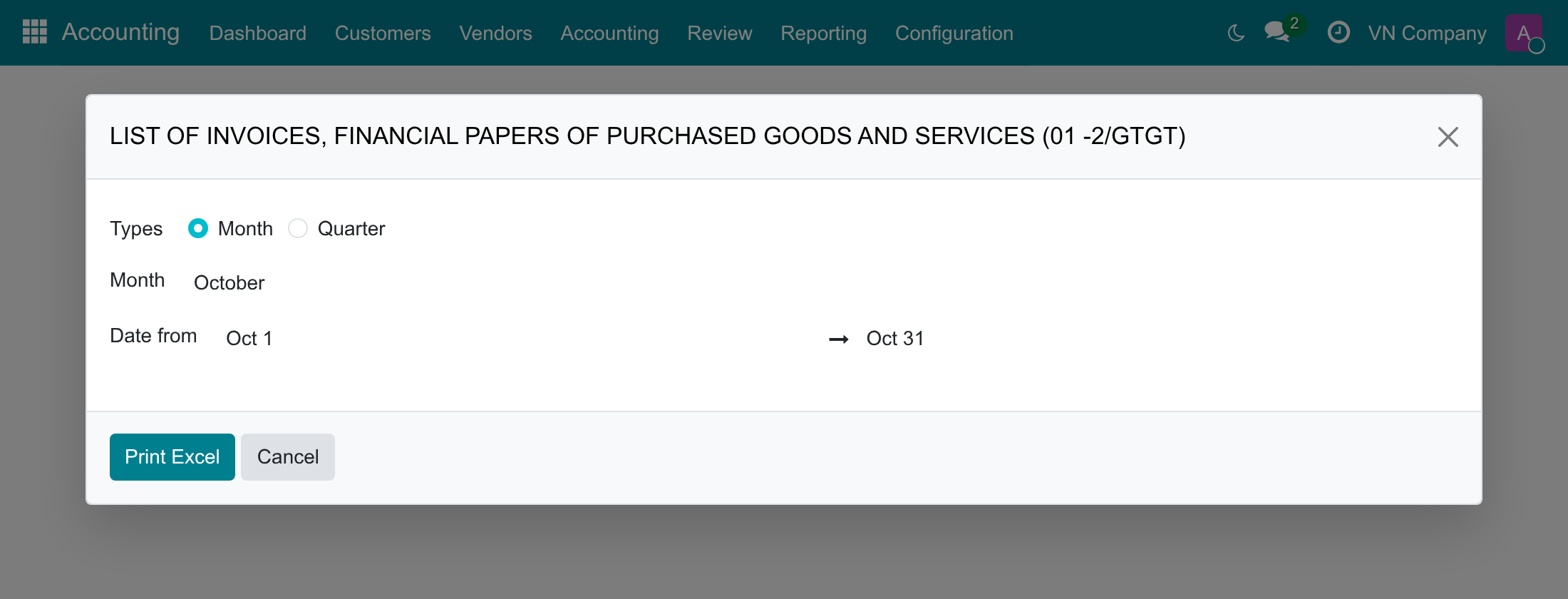
Print the purchase list 01-2/GTGT by month or quarter.
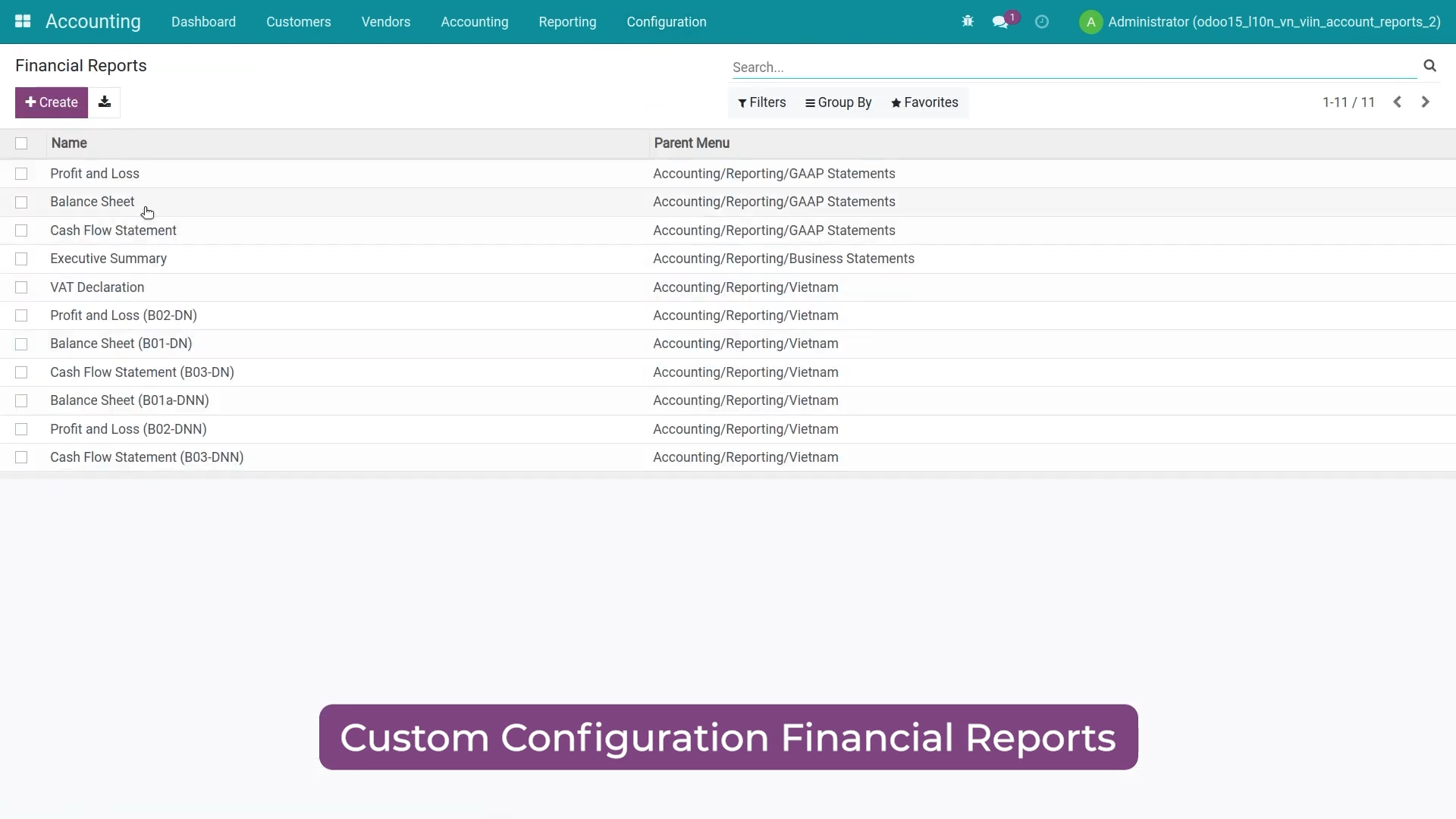
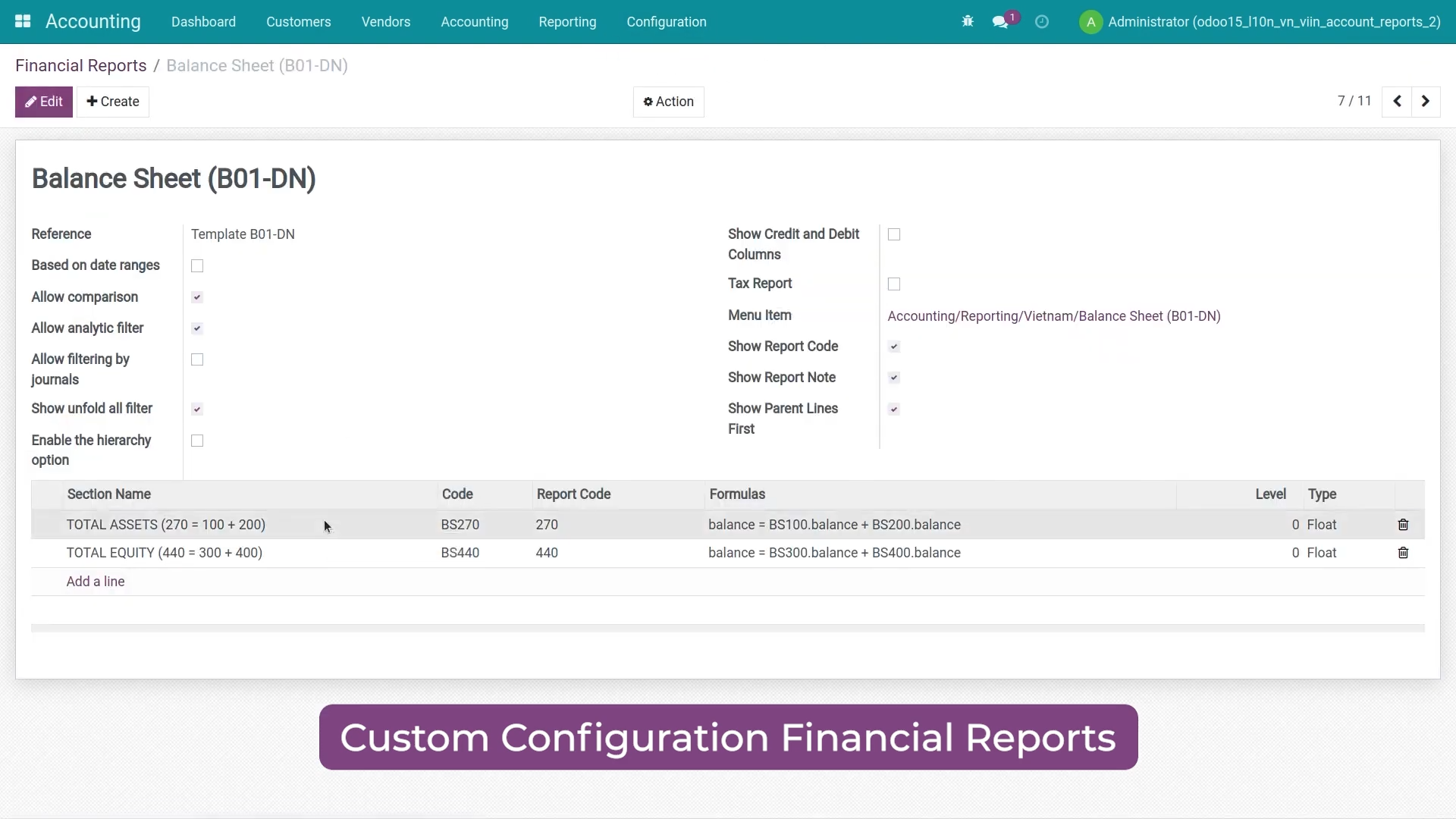
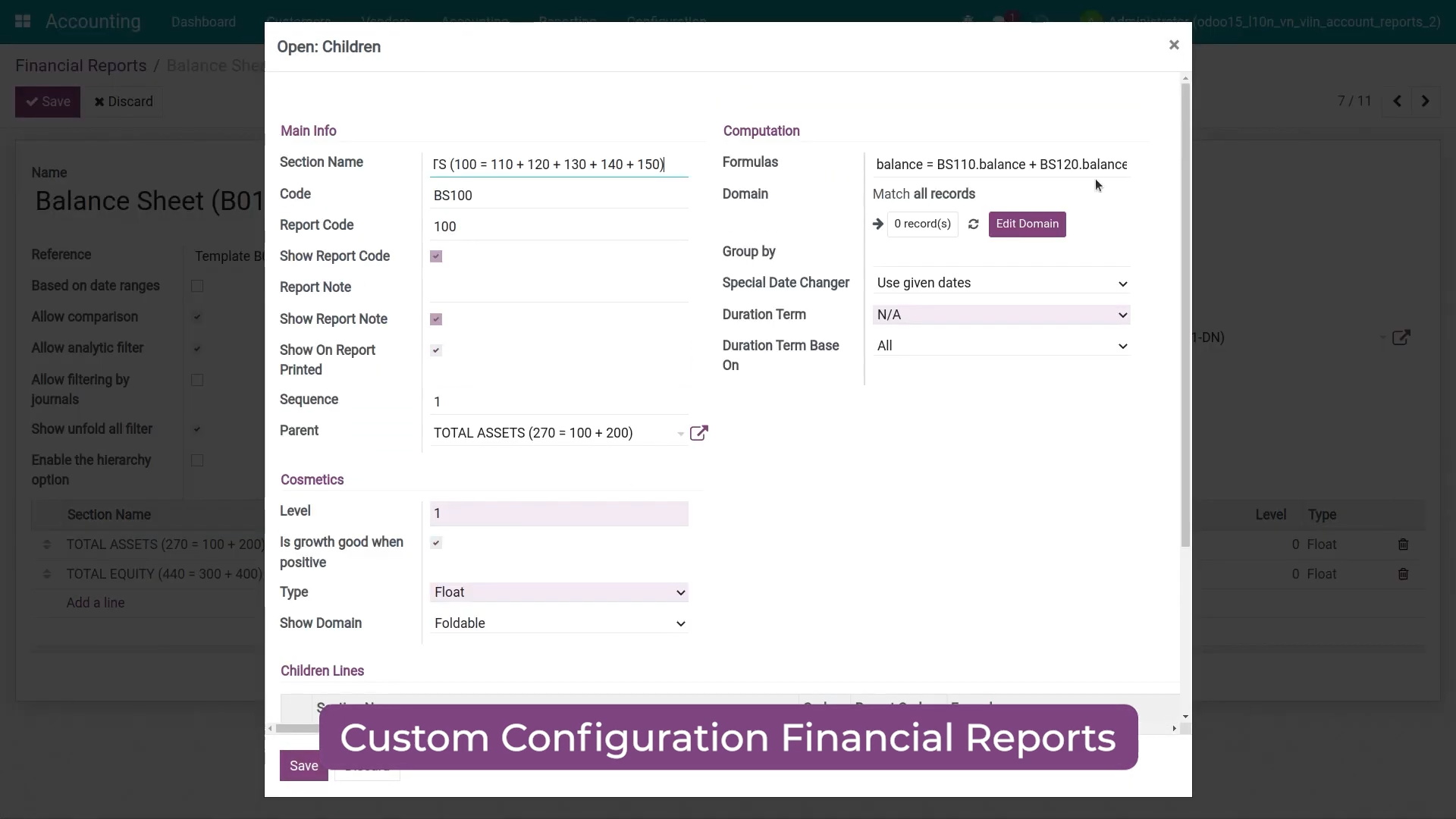
Financial Reports Customization Customize financial reports to your needs
Pre-Sales Question
Need help before purchasing? Share module name & version, edition (Odoo CE / Viindoo Editions), and the issue (trial, payment, installation). Attach screenshots if possible.
sales@viindoo.comSupport
For assistance, include your order number, issue description, expected resolution, and images/videos that replicate the issue.
apps.support@viindoo.comTechnical requirement
- Odoo 19 Community Edition.
- Prerequisites: to_account_reports, l10n_vn_viin, and to_legal_invoice_number.
- Uninstall Odoo default Accounting Reports to avoid conflicts.
- Users who print the Vietnamese statutory reports need the Accounting access right Bookkeeper or Administrator (on a database without the Accounting app, the extra right Show Full Accounting Features).
- Legal context: the module covers report templates and accounting books related to Circular 99/2025/TT-BTC and Circular 133/2016/TT-BTC.
Changes log
- v0.1.24 - Purchase list 01-2/GTGT prints one row per vendor bill and per vendor credit note (bills of two vendors that carry the same number each get their own row), shows the Bill Reference of every document as its number, lists the rows of a section by date then number, and rounds an amount split between sections to the currency so that the sections add up to the bill. The General Journal (S03a-DN) menu names only the Bookkeeper right its report needs. The guide explains that import VAT and customs duty are declared on the customs declaration, and how to correct a vendor bill that carries them.
- v0.1.23 - The imported-goods value lines of the Tax Report (source of 01/GTGT [23]/[23a]) are computed from the tax lines of vendor bills and customs declaration vouchers, the import VAT base includes the customs duty, import taxes due on payment are not reported there, and the lines open their journal items with a Reported Base column. Purchase list 01-2/GTGT lists in full a bill line spread only partly over a VAT section, and prints when the default section analytic account was deleted or no VAT-section analytic account exists. The Vietnamese statutory reports need the Bookkeeper or Administrator access right of Accounting.
- v0.1.10 - Updated the description to match the manifest, and added Circular 99/2025/TT-BTC coverage effective from 01 January 2026.
Who should use this module?
Need VAS-compliant financial packs for board meetings and banking submissions.
Require statutory ledgers, tax listings, and downloadable evidence for audits.
Compare periods across B01/B02/B03 statements and export XLSX for analysis.
This guide is for the accountants and chief accountants of Vietnamese companies who prepare the VAT return (01/GTGT) and the purchase list (01-2/GTGT), and for the administrator who sets up their access.
Installation
- Navigate to Apps.
- Search with keyword l10n_vn_viin_account_reports.
- Press Install.
Note: To have a full feature-related observation of this module, you need to install the Accounting app.
Instructions
Instruction video: Accounting Reports - Vietnam Accounting
To view Financial reports and other accounting reports according to Circular No.99/2025/TT-BTC and Circular No.133/2016/TT-BTC, navigate to Accounting app ‣ Reporting. The Vietnamese reports are grouped as follows:
- Financial report as Vietnam Accounting Standards (VAS), under Statement Reports:
- Profit and Loss;
- Balance Sheet;
- Cash Flow Statement;
- Tax Report (the VAT declaration figures, see the section on imported goods below).
- Other reports, under Vietnam Accounting Reports:
- Account Detail Sheet;
- General Journal and Ledger;
- Account Cash Book and Account Bank Deposit Book.
- Under Invoice Declaration: the lists of invoices of sold goods (01-1/GTGT) and of purchased goods and services (01-2/GTGT).
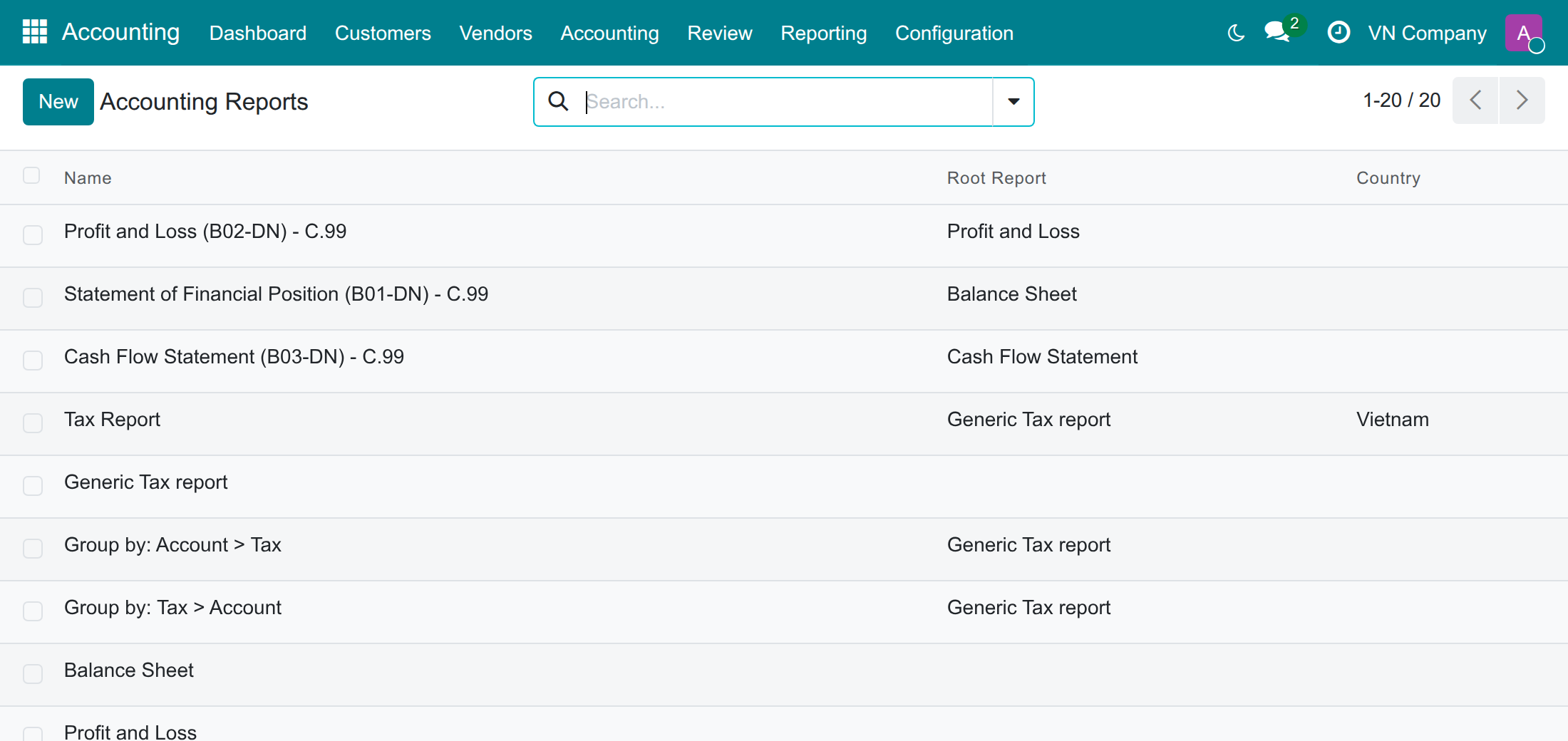
Otherwise, to verify the configuration of financial reports, go to Accounting app ‣ Configuration ‣ Accounting Reports.
- If you know the building method related to financial reports, you can study and configure them properly.
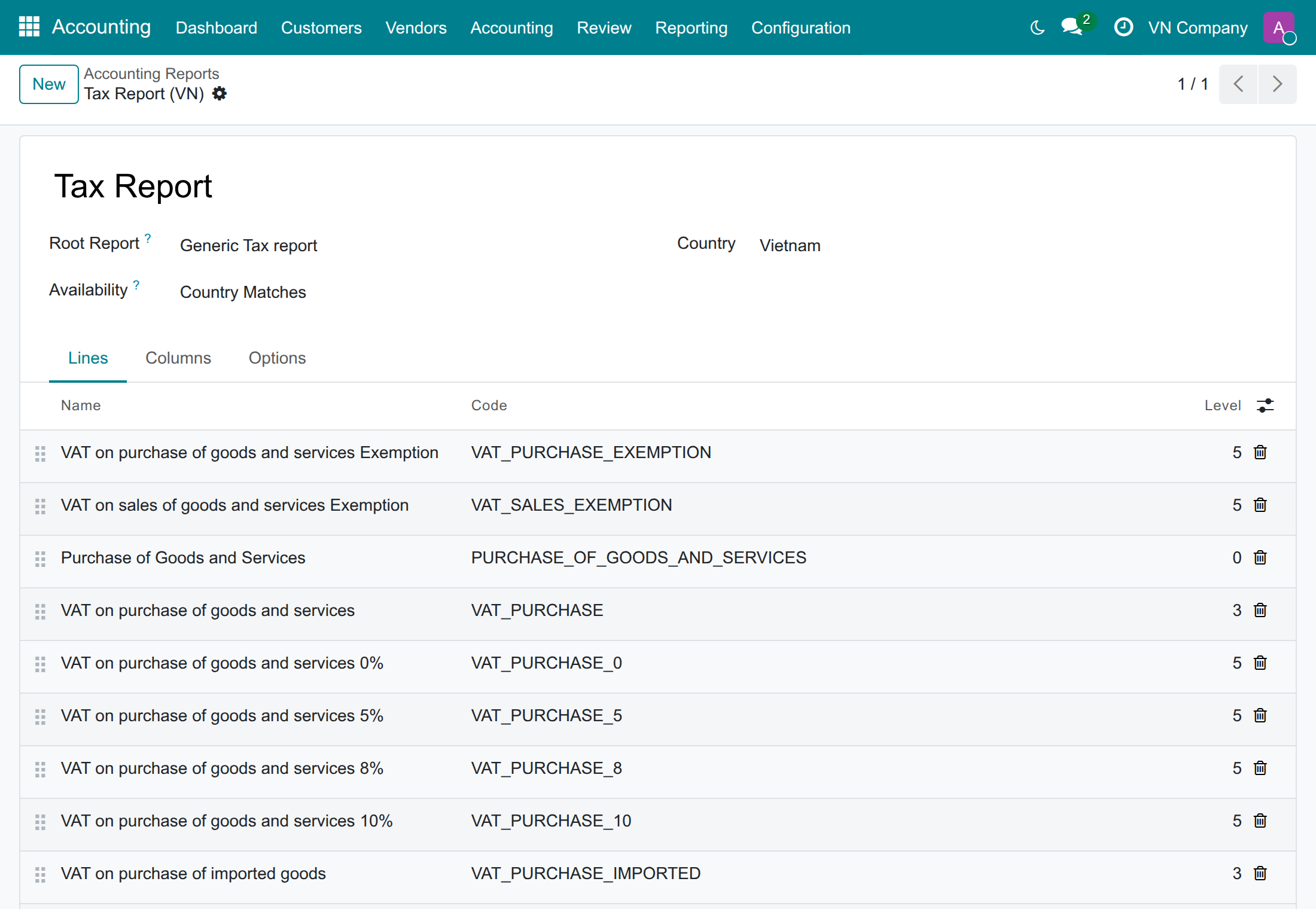
Open a report to see its lines, for example Tax Report.
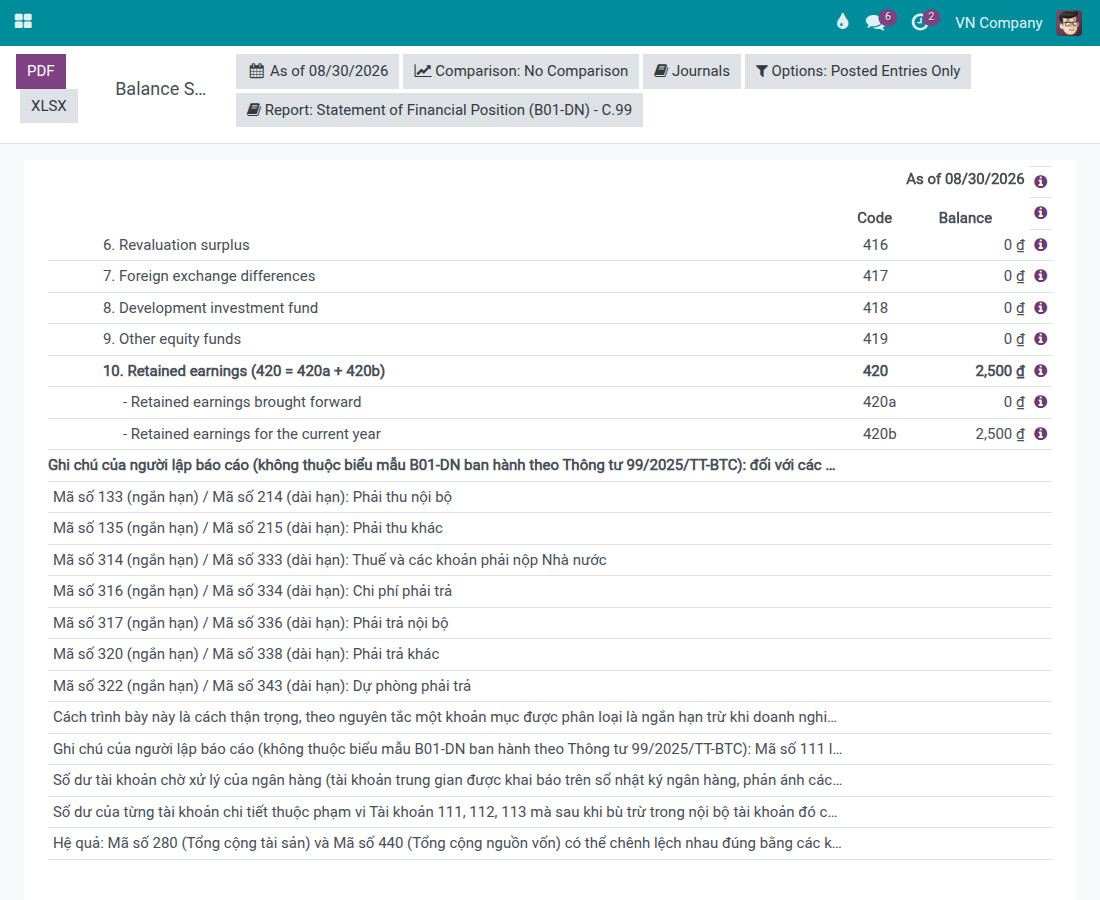
On the Statement of Financial Position (B01-DN) - C.99 report (the Circular No.99/2025/TT-BTC variant of the Balance Sheet), the report also prints a preparer's note, Ghi chú của người lập báo cáo ("Preparer's note"). This note is not part of the official B01-DN form; it is the preparer's own note, added so the statement is never silent about three things:
- Seven pairs of short-term / long-term indicators (mã số 133/214, 135/215, 314/333, 316/334, 317/336, 320/338 and 322/343) for which no due date can be determined, so the whole balance is shown under the short-term indicator.
- Balances excluded from mã số 111 (Cash) - for example a bank's own suspense-account balance, or a detail account left in credit after netting - that then appear on no other indicator of the statement.
- One balance the report cannot recognise and therefore does not exclude: an amount on an account that is not marked as the bank journal's suspense account. The database keeps no record of that setting, so the amount is shown as ordinary cash. The note names this case and asks you to review it and disclose it in the Notes to the Financial Statements (B09-DN).
The note appears at the bottom of the report on screen, in the printed PDF, and in the XLSX export. It only appears on the Statement of Financial Position (B01-DN) - C.99 report; the Profit and Loss (B02-DN) and Cash Flow Statement (B03-DN) reports do not carry it.
To see it, open the Balance Sheet report (Accounting app ‣ Reporting ‣ Statement Reports ‣ Balance Sheet) for a company using the Vietnam chart of accounts, then choose Statement of Financial Position (B01-DN) - C.99 from the Report selector at the top of the report.
Imported goods on the VAT return and the purchase list
This section is for the accountant who declares imported goods. It explains how the imported-goods lines of the Tax Report (the source of the 01/GTGT indicators [23] and [23a]) and the purchase list 01-2/GTGT are worked out.
What you get
- Import VAT and customs duty are declared on the customs declaration of the Foreign Trade modules, and the vendor bill of imported goods is recorded without them. The imported-goods value lines of the Tax Report are computed from the tax lines of the customs declaration vouchers, and the declaration is listed on the purchase list 01-2/GTGT.
- The base of the import VAT includes the customs duty. For goods of 25,000,000 with 10% import duty, the import VAT is calculated on 27,500,000 and the line shows 27,500,000, not 25,000,000.
- Every one of these figures can be opened to see the journal items behind it, with a Reported Base column that adds up to the figure you clicked.
- The purchase list 01-2/GTGT lists a bill in full even when only part of its lines is spread over a VAT section.
Declaring an import
- Record the vendor bill of the foreign vendor for the goods (25,000,000 in our example), without any customs tax.
- Record the import on a customs declaration of the Foreign Trade modules, with its import duty and import VAT (here 10% Import Tax and 10% Import VAT), and confirm it with its clearance date. Its tax vouchers feed the Tax Report lines below.
How a declaration reaches the purchase list 01-2/GTGT is explained in the guide of Accounting Reports - Vietnam Accounting - Foreign Trade.
Reading the lines on the Tax Report
- Go to Accounting app ‣ Reporting ‣ Statement Reports ‣ Tax Report.
- Set the period, for example the clearance month of the declaration. For a company on the Vietnam chart, the Report selector shows Tax Report (VN).
- Look at the lines VAT on purchase of imported goods 0%, 5%, 8% and 10%: the Base Amount column is the base of the import VAT and the Balance column is the import VAT.
For the declaration of the example, the report shows:
| Line | Base Amount | Balance |
|---|---|---|
| VAT on purchase of imported goods 10% | 27,500,000 | 2,750,000 |
| Import Tax 10% | 2,500,000 | |
| Base Import Tax 10% | 25,000,000 | |
| VAT Import Tax 10% | 2,750,000 | |
| VAT Import Tax Base 10% | 27,500,000 |
The totals VAT on purchase of imported goods and Purchase of Goods and Services include the 27,500,000.
- Imports taxed at 0% have no tax line, so the 0% lines (VAT on purchase of imported goods 0%, Base Import Tax 0% and VAT Import Tax Base 0%) are read from the base lines of the documents, without the reverse-charge lines of the customs duty.
- A document is counted once per tax, even when it carries several tax lines.
Opening the journal items behind a figure
- On the Tax Report, click the figure of an imported-goods line, for example the Base Amount of VAT on purchase of imported goods 10%.
- The Journal Items list opens, with the date, the journal entry, the partner, the account, the originator tax, the Balance and the Reported Base.
- The total of Reported Base at the bottom of the list is the figure you clicked. To also see the raw Tax Base Amount of each item, tick it in the optional columns menu at the right of the list header.
On the 0% lines, Reported Base is the balance of the base lines. A reversed customs voucher keeps its Tax Base Amount without a sign, and Reported Base gives the base with its sign, which is the amount the report subtracts.
Credit notes, reversals and past periods
- A reversed customs voucher lowers the base in the month of its reversal date.
- Editing a tax after the document is posted does not change the figures of past periods.
Rules to follow
- Declare the import taxes on the customs declaration. Record the vendor bill of imported goods without them: an import VAT or a duty entered on the bill as well is reported twice, amounts and bases. A bill that already carries them is corrected as shown in Troubleshooting.
- Do not set the import VAT or the customs duty to be due on payment (cash basis). Vietnamese import taxes are due on the customs declaration, so a tax due on payment is not reported on these lines.
- Do not clear the Auditable box of the ten import lines in Accounting app ‣ Configuration ‣ Accounting Reports: the next update of the module puts it back.
Printing the purchase list 01-2/GTGT
- Go to Accounting app ‣ Reporting ‣ Invoice Declaration ‣ List of Invoice, Financial paper of Purchased and Services (01 -2/GTGT).
- Choose Types: Month or Quarter, then the month or the quarter. Date from is filled in for you and can be changed.
- Press Print Excel.
The Excel file is made from the posted vendor bills and vendor credit notes of the period, in four sections: 1. VAT Taxable Goods & Services for Production and Business be eligible for VAT deduction, 2. VAT Exemption Goods & Services for Production and Business, 3. VAT Taxable and Exemption Goods & Services for Production and Business be eligible for VAT deduction and 4. Goods & Services for Investment Projects be eligible for VAT deduction. The section of a bill line follows the VAT-section analytic account it is spread on. For each row, the file shows the bill, its date, the vendor, the tax id, the Untaxed Amount and the Taxes.
- A bill line spread only partly over the VAT-section analytic accounts is listed in full: the share that no section receives goes to the section 3 (taxable and exemption) or, if your company has no such section, to the first section it has.
- Each bill has its own row in each section it is spread on, even when bills of two vendors carry the same number.
- Within a section, the rows follow their date, then their number. An amount split between sections is rounded to the currency, and the last section takes what the rounding leaves, so that the sections add up to the bill.
- The list also works for a company that deleted the default section analytic account, or that has no VAT-section analytic account: every bill is still listed.
- The number of each row is the Bill Reference of the bill or credit note: enter there the number printed by the vendor. A credit note made with the Credit Note button of a bill gets Reversal of: <bill number> in this field; replace it with the number of the vendor's credit note. A document whose Bill Reference is empty shows its own number.
- This list reads vendor bills and vendor credit notes only. Customs declarations are listed by the customs-declaration reporting extension of the Foreign Trade modules, when it is installed.
Who can run these reports
The purchase list 01-2/GTGT, the sold list 01-1/GTGT and the account books (S38-DN, S03a-DN, S03b-DN, S07-DN and S08-DN) need the Accounting access right Bookkeeper, or Administrator, which includes it. A user without it does not see their menus, and the download of a list is refused to them.
On a database where the Accounting app is not installed, this right is the extra right Show Full Accounting Features, and the role Administrator of the Accounting line of the user form does not give it by itself.
The Tax Report, with its imported-goods lines, also opens for an Administrator without this right and for a user with one of the read accounting roles (Invoicing & Banks or Auditor - Readonly of the Accounting app); such a user cannot print the purchase list. A customs declarant of the Foreign Trade modules, who has no accounting right, opens neither. A user with the Invoicing role only cannot open the Tax Report.
To give the right to an accountant, the administrator:
- Goes to Settings ‣ Users & Companies ‣ Users and opens the user.
- In the tab Access Rights, sets the Accounting line to Bookkeeper (or Administrator), then saves.
- Without the Accounting app: activates the developer mode, then in the same tab, section Extra Rights, ticks Show Full Accounting Features.
Troubleshooting
- The import figures are twice the expected ones, or a vendor bill carries the import duty or the import VAT. The import taxes belong on the customs declaration. Correct the bill with its usual actions: Reset to Draft, remove the import duty and the import VAT from its lines and Confirm it again, or, once it is in draft, Cancel it and record the bill again; then declare those taxes on the customs declaration. If the period is already filed, correct the return through the usual adjustment procedure.
- An import tax due on payment is missing from the lines. Import taxes due on payment are not reported there. Change the tax so that it is due on the invoice, as the taxes of the chart are.
- The report refuses to open with a message saying that report lines read the same import base grid but differ in date scope (or in duration term). Two lines of the Tax Report that read the same import base were given different settings. Open the report in Accounting app ‣ Configuration ‣ Accounting Reports and give them the same date scope, or the same duration term.
- An access error opens when you print the purchase list. See Who can run these reports.
This software and associated files (the "Software") may only be used (executed, modified, executed after modifications) if you have purchased a valid license from the authors, typically via Odoo Apps, or if you have received a written agreement from the authors of the Software (see the COPYRIGHT file).
You may develop Odoo modules that use the Software as a library (typically by depending on it, importing it and using its resources), but without copying any source code or material from the Software. You may distribute those modules under the license of your choice, provided that this license is compatible with the terms of the Odoo Proprietary License (For example: LGPL, MIT, or proprietary licenses similar to this one).
It is forbidden to publish, distribute, sublicense, or sell copies of the Software or modified copies of the Software.
The above copyright notice and this permission notice must be included in all copies or substantial portions of the Software.
THE SOFTWARE IS PROVIDED "AS IS", WITHOUT WARRANTY OF ANY KIND, EXPRESS OR IMPLIED, INCLUDING BUT NOT LIMITED TO THE WARRANTIES OF MERCHANTABILITY, FITNESS FOR A PARTICULAR PURPOSE AND NONINFRINGEMENT. IN NO EVENT SHALL THE AUTHORS OR COPYRIGHT HOLDERS BE LIABLE FOR ANY CLAIM, DAMAGES OR OTHER LIABILITY, WHETHER IN AN ACTION OF CONTRACT, TORT OR OTHERWISE, ARISING FROM, OUT OF OR IN CONNECTION WITH THE SOFTWARE OR THE USE OR OTHER DEALINGS IN THE SOFTWARE.
