Sales Order Product Duplication Warning
by Viindoo
| Lines of Code | 439 |
| Technical name | viin_sale_product_duplication_warning |
| License | OPL-1 |
| Website | https://viindoo.com/apps/modules/19.0/viin_sale_product_duplication_warning |
| Read description for | v 13.0 v 14.0 v 15.0 v 16.0 v 17.0 v 18.0 |
| Required Apps | Invoicing (account) Discuss (mail) |
| Included Dependencies | Sales Lines Numbering |

Catch a product entered twice before the quotation goes out
For sales teams whose quotations carry many lines
Show warning on product duplication (appearing more than 1 time) on the same sales order
Odoo 19.0 · Community and Enterprise · OPL-1
Extends Sales Lines Numbering: the line numbers quoted in the warning come from it.
What changes for your team
A repeated product is pointed out while the quotation is written
A copied line or a product added twice is easy to miss on a long quotation, and the customer is the one who finds it.
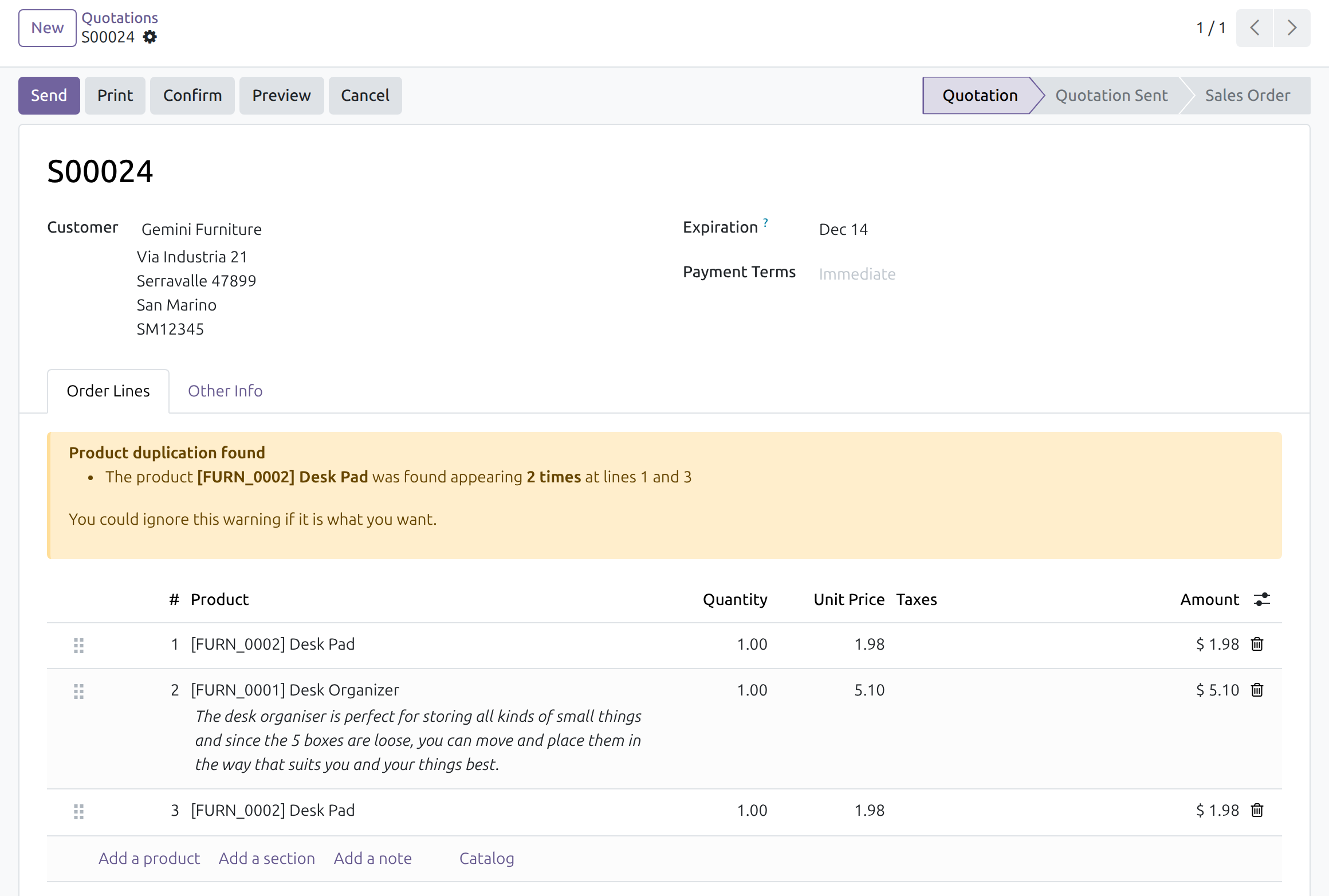
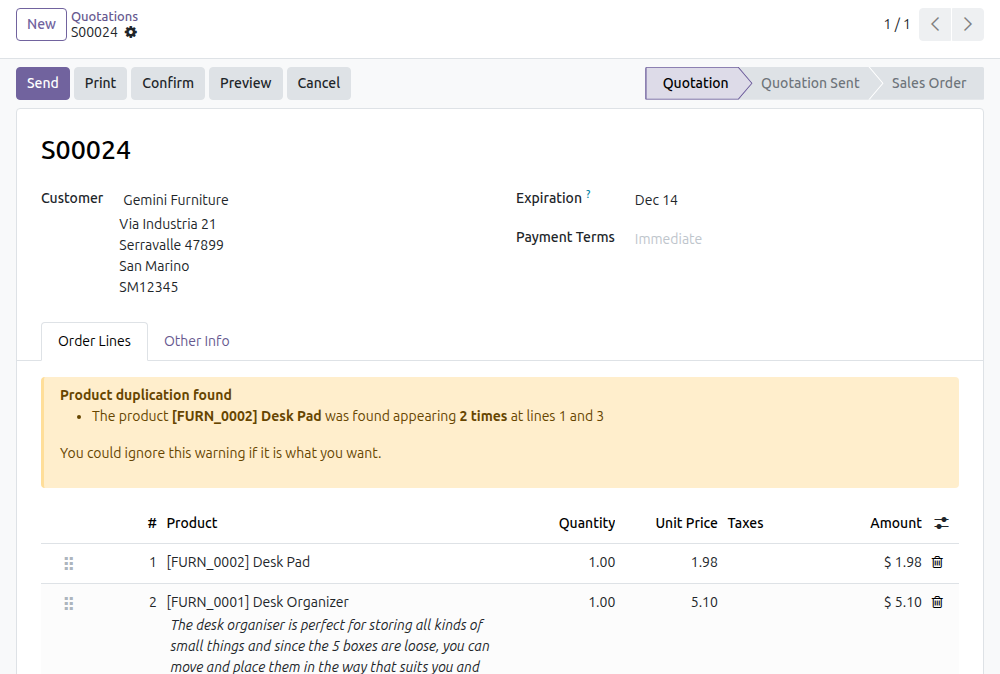
→ A warning above the order lines names the product, how many times it appears and on which lines.

The documents to review are one filter away
Finding which open quotations carry a repeated product means opening them one by one.
→ The With Duplicated Products filter lists every quotation and sales order that has one.
Products meant to repeat stay quiet
Some products are expected several times on one order, and a warning on each of them is noise.
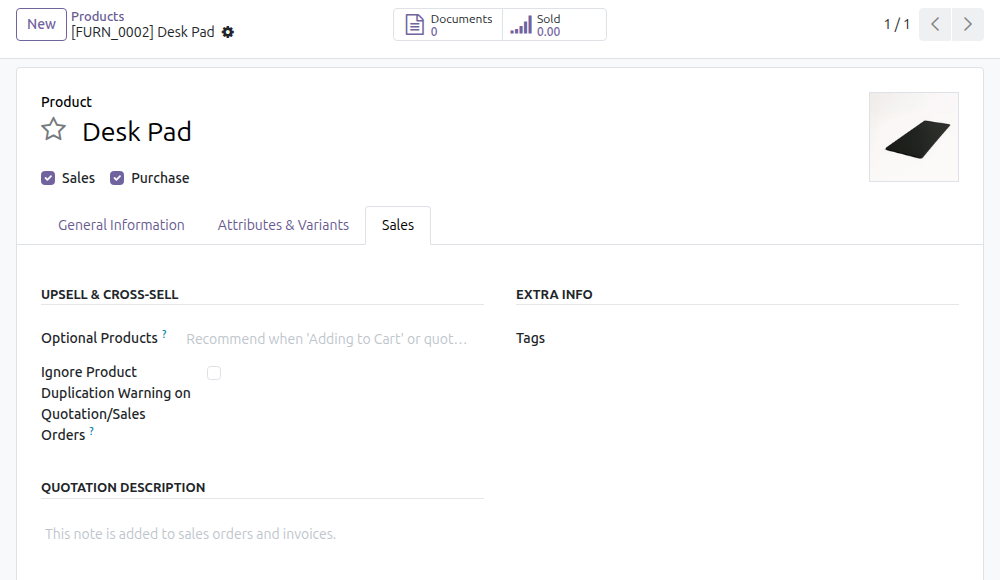
→ One checkbox on the product leaves it out of the warning and the filter.
Ready on day one
The warning
Shows on quotations as soon as the module is installed, for every product.
The filter
Available in the search of quotations and sales orders, next to the standard filters.
One optional step
Tick the option on the products that are meant to repeat. There is no other setting.
What is included
The duplication warning on quotations, the filter on quotations and sales orders, and the per-product opt-out. It needs the Sales app and Sales Lines Numbering, which is installed with it.
Before you decide
Does it stop a quotation from being sent or confirmed?
No. It warns and never blocks: the salesperson saves, sends and confirms as usual.
What counts as a duplicate?
The same product on more than one line of the same document. Two variants of one product, such as two sizes, are different products and raise no warning.
Does it cover confirmed orders?
The warning shows while the document is a quotation, sent or not. The filter finds repeated products on confirmed sales orders as well.
Who decides which products may repeat?
Whoever may edit products. Salespeople see the warning but do not switch it off unless they hold that right.
Which languages does it ship?
English and Vietnamese.
Try it, then ask us
Read the Documentation tab of this listing, open the live preview, or watch the video above.
Pre-sales & partnership
viindoo.com/contactusTechnical support
viindoo.com/ticketTechnical requirements
- Odoo version: 19.0
- Editions: Community, Enterprise
- Required modules: Sales, Sales Lines Numbering
- License: OPL-1
- Languages: English, Vietnamese
Sales Order Product Duplication Warning
Audience: salespeople who prepare quotations and sales orders, the people who maintain the product catalog, and the administrator who installs the module.
Note
Extends Sales Lines Numbering - see its documentation: to_sale_line_numbering. The line numbers quoted in the warning come from that module.
Overview
Adding the same product to a quotation twice is usually a slip: a line copied by mistake, or a quantity that should have been increased instead. This module shows a warning above the order lines as soon as a product appears more than once on the same quotation, and tells you at which lines. It also adds a filter that lists every quotation or order containing a duplicated product, and lets you switch the check off for products that legitimately appear several times.
The warning never blocks anything: you can save, send and confirm the quotation as usual.
| Role | What they do | Access right to assign |
|---|---|---|
| Administrator | Installs the module (it has no settings). | Administration / Settings |
| Salesperson | Reads the warning on quotations and finds orders with duplicated products. | Sales: User: Own Documents Only |
| Product maintainer | Switches the check off for products that are meant to repeat. | Products: Create |
Setup (for the Administrator)
- Open Apps.
- Remove the default filter and search for viin_sale_product_duplication_warning.
- Click Activate on the module card.
The module needs the Sales order lines numbering (to_sale_line_numbering), which is installed with it. The Sales menu that this guide starts from (Sales > Orders > Quotations) is shown by the Sales app (technical name sale_management); install that app too if your database does not have the Sales menu yet. The module adds no menu and no setting of its own.
Salesperson: spot repeated products on a quotation
Read the duplication warning
- Open Sales > Orders > Quotations and create a quotation, or open an existing one.
- On the Order Lines tab, add products. When you add a product that is already on the quotation, a yellow box titled Product duplication found appears above the lines.
- Read the message: it names the product, how many times it appears and at which line numbers (for example "appearing 2 times at lines 1 and 3"). Line numbers are the ones in the # column; a new line gets its number when the quotation is saved.
- Remove the extra line, or raise the quantity of the first one. If the repetition is what you want, ignore the box: it ends with "You could ignore this warning if it is what you want."
The warning is shown while the quotation is in the Quotation or Quotation Sent status; it disappears once the order is confirmed or cancelled. It disappears as well when the duplicated lines are removed.
Find quotations and orders with duplicated products
- Open Sales > Orders > Quotations (or Sales > Orders > Orders).
- Click the arrow at the right of the search box to open the filters.
- Choose With Duplicated Products.
The list keeps only the documents where at least one product appears on more than one line. Products flagged to be ignored (next section) are not counted.
Product maintainer: allow a product to repeat
Some products are expected several times on one order, for example the same service ordered with different descriptions. For those, switch the warning off on the product.
- Open Sales > Products > Products and open the product.
- Go to the Sales tab.
- Tick Ignore Product Duplication Warning on Quotation/Sales Orders.
- Save.
From then on, repeating this product on a quotation raises no warning and the product is left out of the With Duplicated Products filter. Untick the box to bring the check back.
Editing a product needs the Products: Create access right.
This software and associated files (the "Software") may only be used (executed, modified, executed after modifications) if you have purchased a valid license from the authors, typically via Odoo Apps, or if you have received a written agreement from the authors of the Software (see the COPYRIGHT file).
You may develop Odoo modules that use the Software as a library (typically by depending on it, importing it and using its resources), but without copying any source code or material from the Software. You may distribute those modules under the license of your choice, provided that this license is compatible with the terms of the Odoo Proprietary License (For example: LGPL, MIT, or proprietary licenses similar to this one).
It is forbidden to publish, distribute, sublicense, or sell copies of the Software or modified copies of the Software.
The above copyright notice and this permission notice must be included in all copies or substantial portions of the Software.
THE SOFTWARE IS PROVIDED "AS IS", WITHOUT WARRANTY OF ANY KIND, EXPRESS OR IMPLIED, INCLUDING BUT NOT LIMITED TO THE WARRANTIES OF MERCHANTABILITY, FITNESS FOR A PARTICULAR PURPOSE AND NONINFRINGEMENT. IN NO EVENT SHALL THE AUTHORS OR COPYRIGHT HOLDERS BE LIABLE FOR ANY CLAIM, DAMAGES OR OTHER LIABILITY, WHETHER IN AN ACTION OF CONTRACT, TORT OR OTHERWISE, ARISING FROM, OUT OF OR IN CONNECTION WITH THE SOFTWARE OR THE USE OR OTHER DEALINGS IN THE SOFTWARE.